Ecommerce SEO › Content
Buying Guides and Comparison Pages That Support the Sale
Product pages convert shoppers who already know what they want. Buying guides and comparison pages win the ones who don’t, at the exact moment they’re deciding. Done right, this is the highest-return content a store can publish, because it ranks for buyer-intent searches and routes readers straight to the products that answer them.
By Rahul Saini, Author at Search Counsel Co. Last updated [Month] 2026. Part of our ecommerce SEO guide.
Featured answer: what makes commerce content actually drive sales?
Commerce content drives sales when it targets a decision the shopper is already making, buying guides, comparisons, and “best” lists, and links directly into the product and category pages that fulfil that decision. The content ranks for the research query; the internal links carry the reader the last step to purchase.
Why guides beat blog posts. A generic blog post attracts readers. A buying guide attracts buyers. Because the reader of “how to choose a running shoe for your foot type” is actively shopping, that page tends to earn far more revenue per visit than a top-of-funnel article, by some agency measures several times more. Same effort, very different return.
On this page
1) Why this content wins
Most stores treat content as a traffic exercise: publish blog posts, watch the visitor count. The stores that win treat content as a revenue channel where every page connects to a product or category.
The reason buying guides and comparison pages outperform is intent. Someone reading “best cordless vacuum for pet hair” isn’t idly curious; they’re picking one to buy this week. That page can rank for a commercial query, prove you know the category, and hand the reader a shortlist of products, all on one screen. Agencies that measure content by revenue per visit, not pageviews, consistently find guides of this kind earn several times more than standard blog posts. One store that built out product guides and optimized its category pages reported an organic revenue increase of roughly 122% within six months. The lift comes from matching content to a purchase decision, then removing the friction between the two.
2) The three content types and where each fits
Map every piece of content to a stage of the buyer’s journey before you write it. That single habit prevents the most common ecommerce content mistake: a pile of awareness-stage posts and almost nothing for the people close to buying.
- Awareness (learning). Broad questions like “what are the different types of running shoes.” Useful for reach and trust, but the reader is far from a purchase. Keep this the smallest slice.
- Consideration (deciding). Buying guides, comparisons, and “best” lists. The reader knows they want the category and is choosing within it. This is where the revenue is, so this should be the largest slice.
- Decision (buying). Content that removes the last objections, sizing help, care and warranty details, often living on or beside the product page. Smaller in volume, high in impact.
A workable target for most stores is roughly a fifth of content on awareness, half on consideration, and the rest on decision. If your blog is 90% “what is” articles, you’re funding the top of the funnel and starving the middle where buyers actually convert. Which specific queries each piece should target is a keyword-research question, covered in ecommerce keyword research.
3) How to write a buying guide that sells
A buying guide’s job is to help someone choose confidently and then make the choice easy to act on. Structure it so it ranks and converts at the same time:
- Answer the core question early. Open with a short, direct answer to what the reader is deciding (“For most runners, cushioning and foot type matter more than brand”). This satisfies the search intent and gives search engines and AI a clean block to pull.
- Lay out the decision criteria. Explain the two to five things that actually matter when choosing, in plain language. This is where you demonstrate real expertise rather than repeating spec sheets.
- Make specific recommendations. Name products for each use case (“best for flat feet,” “best on a budget”) and link each one to its product page. A guide with no products to click is a missed sale.
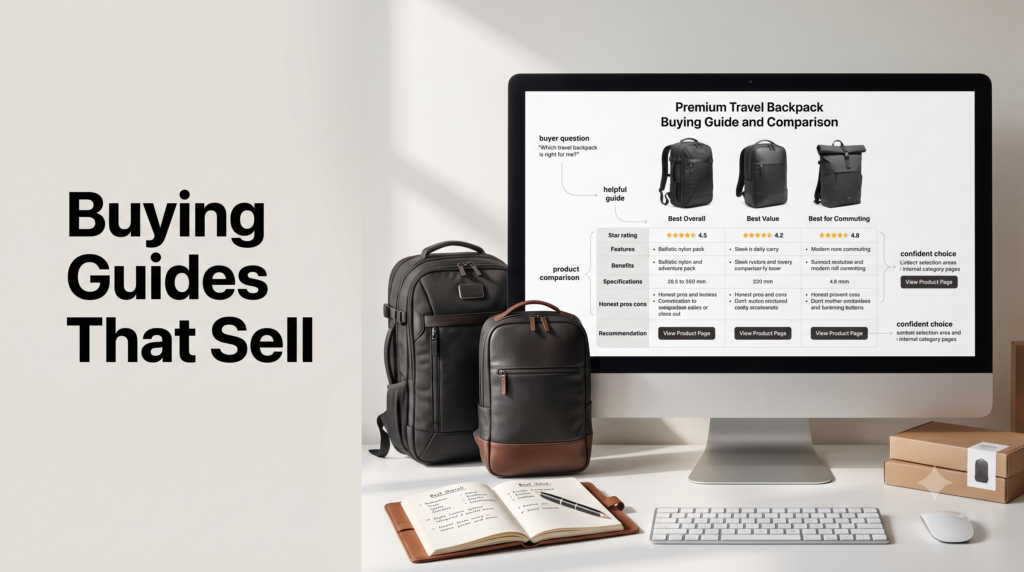
- Add a comparison table. A compact table of the shortlisted options, with the criteria as columns, lets scanners decide in seconds and is exactly the format that wins featured snippets.
- Answer the follow-up questions. Close with a short FAQ using the real questions people ask about the category. These can capture People Also Ask boxes and reassure the last few doubters.
Write it in your own voice with first-hand detail. Manufacturer copy and spec-sheet regurgitation read as thin to both shoppers and search engines. The page-level craft of making content extractable and trustworthy is covered in our on-page content guide; here the point is that the guide must earn the reader’s decision, not just describe products.
4) Comparison, “vs” and “best” pages
Comparison content captures shoppers at the sharpest moment of intent, when they’ve narrowed to a couple of options and just need help choosing. It comes in three common shapes:
- “X vs Y” pages. “[Model A] vs [Model B]” targets someone about to buy one of two specific things. These work especially well for stores that carry multiple brands, because you win whichever way the reader decides.
- “Best [category]” lists. “Best standing desks for small spaces” targets commercial-investigation intent and ranks for competitive terms while organizing your own catalog around a clear use case.
- Alternatives pages. “[Popular product] alternatives” captures demand for a well-known item you may not stock, and redirects it to what you do.
Whatever the shape, the structure that ranks is consistent: a clear recommendation up top, a feature comparison table, honest pros and cons for each option, and direct links to the relevant product pages. Be honestly useful, including where a competitor’s product wins on a specific point; readers trust a guide that admits trade-offs, and that trust is what converts. Note that “vs” and “best” queries are commercial, so these pages belong in your consideration content, not buried in a generic blog feed.
5) The money move: link editorial into commercial
This is the single highest-return habit in ecommerce content, and the one most stores skip. Every guide, comparison, and article should link into the category and product pages it discusses, and your commercial pages should link back out to the guides that support them.
The pattern looks like this: a “how to choose a mattress” guide links to the mattress category page and to the specific models it recommends; the category page links to the guide for shoppers who want help deciding; each product page links to the comparison that features it. This does three things at once. It gives readers a natural path from research to purchase, it passes ranking signals from content that attracts links toward the revenue pages that need them, and it helps search engines understand how your pages relate. Audit your best product pages for ones with few internal links, then route your guides directly into them. Broader topical-authority structure lives in our content strategy hub, but the store-specific move is simple: no guide should be a dead end.
Free resource
Check your content-to-commerce links
Our Ecommerce SEO Audit Checklist includes a content section: funnel coverage, guide-to-PDP linking, and orphaned-content checks. Prefer it handled for you? See our ecommerce SEO service.
6) Common mistakes
- Over-investing in awareness content. Endless “what is” posts bring traffic that rarely buys. Shift the balance toward consideration-stage guides and comparisons.
- Guides with no products to click. If a buying guide doesn’t link to specific product and category pages, it educates the reader and then loses the sale.
- Reusing manufacturer copy. Descriptions shared across dozens of retailers are duplicate content everywhere but the original. Write unique guidance in your own words.
- Orphaned content. A guide with no internal links in or out passes no value and is hard to find. Wire every piece into the relevant commercial pages.
- Measuring the wrong thing. Judging content by pageviews hides whether it sells. Track assisted conversions and revenue paths instead, which is covered in our analytics guide.
- Publishing and forgetting. Buyer language, products, and comparisons date quickly. Refresh guides so the recommendations and prices stay current.
7) Guides, comparisons and AI shopping
This content pays off twice, because AI assistants lean on exactly these pages when they answer shopping questions. When someone asks an AI which product to buy, it pulls from buying guides, comparisons, and support content far more than from bare product pages. The store in the earlier example saw a sharp rise in referral traffic from ChatGPT citing its content, a preview of where this is heading. The same guides and comparisons that route human shoppers to your products are what make you citable in AI answers. We go deeper on that in building a content ecosystem for AI shopping and our AI search guide.
8) Sources used
| Source | What it supports |
|---|---|
| EcomSEO, Gorgias and BigCommerce content guides | Buying guides as the highest-value content type, the awareness/consideration/decision mix, comparison-page structure, and the manufacturer-copy duplicate-content trap. Directional. |
| NAV43, Search Engine Land and ecommerce SEO analyses | The editorial-to-commercial internal-link tactic, routing guides into top product pages, and measuring content by revenue rather than traffic. |
| Content-strategy case study (via NAV43) | The organic-revenue lift from product guides plus category optimization, and the rise in AI referral traffic. Single case, directional. |
FAQ: ecommerce buying guides and comparison pages
What is the difference between a buying guide and a comparison page?
A buying guide helps someone choose within a whole category, explaining the criteria that matter and recommending products for different needs (“how to choose a running shoe”). A comparison page pits specific options against each other for a reader who has already narrowed the field (“Model A vs Model B,” or “best trail running shoes”). Guides serve earlier consideration; comparisons serve the moment just before purchase. Most stores need both.
Do buying guides really drive more sales than blog posts?
Generally, yes, because of who reads them. A buying guide attracts shoppers actively choosing a product, while a typical awareness blog post attracts people much earlier in their thinking. Measured by revenue per visit rather than raw traffic, guides tend to outperform standard posts by a wide margin. The effect depends on linking each guide to the relevant product and category pages so readers can act on the recommendation.
Should comparison pages link to competitor products?
Link to your own product and category pages, and be honest in the copy about where each option wins, including a competitor’s strengths. You don’t need outbound links to competitors, but pretending your product is best at everything erodes the trust that makes a comparison convert. Readers can tell when a “comparison” is really a one-sided pitch, and they bounce.
How many buying guides does a store need?
Start with one guide per major category or key buying decision, not one per product. A store with ten categories might begin with ten strong guides plus a handful of high-value comparisons, then expand into subcategories and use cases over time. Depth beats volume: a few thorough, well-linked guides outperform dozens of thin ones that target the same terms and compete with each other.
Where should buying guides live on the site?
Usually in a blog, resources, or guides section, with clear internal links to the commercial pages they support. What matters more than the URL folder is the linking: each guide should link into its category and product pages, and those pages should link back to the guide. Keeping guides discoverable and connected is what turns them from isolated articles into a path to purchase.
Where to go next
Buying guides and comparisons are the bridge between research queries and revenue pages. Build them around the right keywords, link them into the pages that convert, and measure them by sales, not clicks.
From here, strengthen the pages they link into with category page SEO and product page SEO, check what your platform makes easy in Shopify vs WooCommerce SEO, or step back to the full ecommerce SEO guide.
Editorial note: This guide is for general marketing education. The revenue and traffic figures cited here come from individual case studies and agency measurements; they’re directional and vary by store, category, and execution. Test content types against your own analytics before committing a large program.