Ecommerce SEO › Platform Comparison
Shopify vs WooCommerce SEO: Which Is Better in 2026?
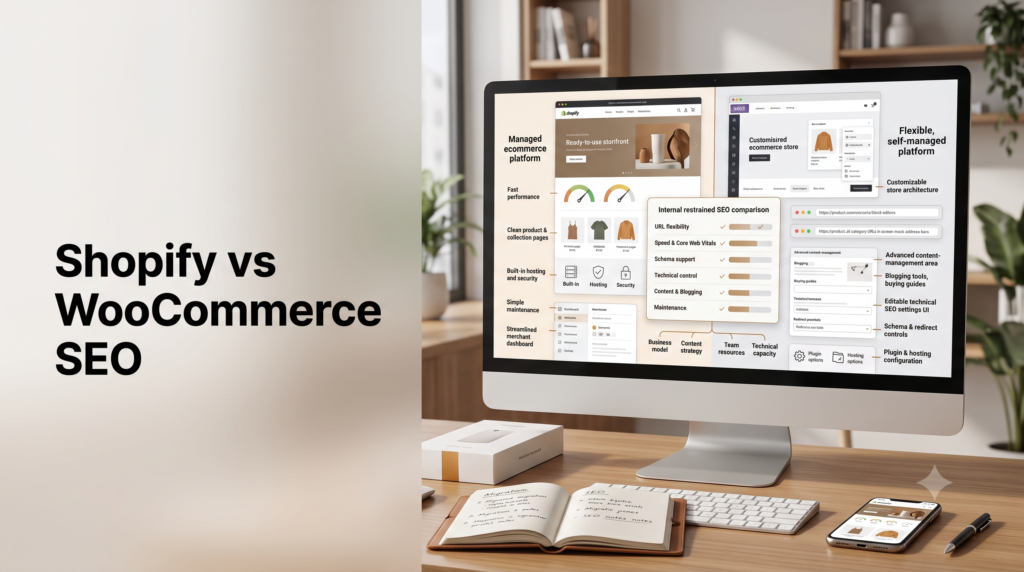
Shopify does not have worse SEO because its product URLs contain /products/, and WooCommerce does not automatically have better SEO because it gives you more technical control. Shopify reduces implementation and maintenance work. WooCommerce gives experienced teams more freedom. The better SEO platform depends on your catalog, content strategy, international setup, technical resources, and migration risk.
By Rahul Saini, Founder / SEO Strategist at Search Counsel Co. Updated September 2026. Part of our ecommerce SEO guide.
Quick verdict: Is Shopify or WooCommerce better for SEO?
Neither platform has an automatic Google ranking advantage. Shopify gives most merchants a more managed SEO environment with hosted infrastructure, automatic sitemap generation, canonical handling, and structured-data support through supported themes. WooCommerce gives technically capable teams much deeper control over URLs, hosting, plugins, server behavior, content architecture, and custom implementations.
Choose Shopify when reducing technical overhead matters more than maximum control. Choose WooCommerce when your SEO strategy genuinely requires deeper customization and you have the resources to maintain it.
Lower maintenance
Shopify
More technical control
WooCommerce
Already ranking well
Usually stay put
The decision most comparisons miss: More SEO control is useful only when you actually need that control. A platform with fewer configuration options can sometimes reduce crawl, canonical, performance, and maintenance mistakes rather than limit organic growth.
On this page
- Shopify vs WooCommerce SEO scorecard
- How we compare the platforms
- What Google needs from either platform
- URL structure and the Shopify /products/ myth
- Site architecture and internal linking
- Crawling, robots.txt, sitemaps, and canonicals
- Product schema and structured data
- Merchant Center and product feeds
- Speed and Core Web Vitals
- Blogging and content SEO
- Large catalogs and faceted navigation
- International SEO
- SEO apps vs WordPress plugins
- Which platform fits different store types?
- Should you migrate just for SEO?
- SEO migration checklist
- Frequently asked questions
- Sources and methodology
Shopify vs WooCommerce SEO Scorecard
The useful comparison is not simply which platform has more features. It is which differences materially affect your SEO strategy.
| SEO issue | Shopify | WooCommerce | When it matters |
|---|---|---|---|
| URL flexibility | Fixed platform paths | Highly configurable | Architecture, migrations, unusual URL requirements |
| Hosting | Managed | Merchant controlled | Performance, uptime, server configuration |
| Product structured data | Supported through modern supported themes/platform output | Core WooCommerce generates structured product data | Rich-result and product-data eligibility |
| robots.txt control | Customizable within Shopify’s system | Full WordPress/server control | Complex crawling and filter situations |
| XML sitemaps | Automatic | WordPress/plugin dependent | Large or custom indexation strategies |
| Blogging/CMS | Suitable for normal ecommerce publishing | Full WordPress CMS | Content-heavy organic acquisition |
| Performance responsibility | Platform managed | Hosting/theme/plugin dependent | Teams without technical resources |
| Large-catalog control | More opinionated | More configurable | Filters, facets, crawl management, custom architecture |
| International SEO | Shopify Markets automates several elements | Highly flexible but implementation dependent | Multi-country and multilingual stores |
| Maintenance burden | Lower | Higher | Smaller teams and stores without developers |
How Search Counsel Co Compares Shopify and WooCommerce SEO
We separate platform differences into three categories.
1. Platform defaults
Behavior provided without extensive additional configuration.
Examples include Shopify’s hosted infrastructure and automatic sitemap generation.
2. Configurable platform limitations
Things that differ by platform but can be modified or extended.
Examples include structured data, templates, filter handling, redirects, and many SEO settings.
3. Implementation-dependent SEO
Things that can be good or bad on either platform depending on the store.
Examples include:
- content quality;
- internal linking;
- Core Web Vitals;
- category-page quality;
- product descriptions;
- canonical accuracy;
- schema completeness;
- faceted navigation;
- backlinks.
This matters because a configurable platform is not automatically a better-ranking platform.
What Google Actually Needs From Either Ecommerce Platform
Before comparing platform features, it helps to start with Google’s ecommerce requirements.
A store needs Google to be able to:
- crawl important category and product URLs;
- discover products through internal links;
- identify the preferred canonical versions of pages;
- understand product information;
- process structured data accurately;
- access useful text, images, prices, availability, and variant information;
- receive consistent product data where Merchant Center feeds are used.
Google’s ecommerce documentation emphasizes site navigation and link relationships rather than requiring one particular ecommerce CMS.
The important implication: Shopify and WooCommerce can both satisfy Google’s core ecommerce requirements. The real difference is how much of the implementation the platform manages for you and how much responsibility stays with your team.
Does Shopify’s /products/ URL Structure Hurt SEO?
Not by itself.
Shopify uses fixed URL patterns such as:
/products/product-name
/collections/category-name
/blogs/blog-name/article-name
WooCommerce can support far more customizable permalink structures.
That makes WooCommerce the clear winner for URL flexibility.
It does not automatically make WooCommerce the winner for rankings.
Why folder depth is often overstated
Google’s ecommerce guidance explains that Google generally understands a site’s relative page importance and hierarchy from how pages link to one another rather than relying primarily on URL folders.
That means a product at:
/products/running-shoedoes not automatically rank worse than:
/mens/shoes/running/running-shoebecause the second URL looks more hierarchical.
What matters more
- Can users reach the product through relevant category pages?
- Are important pages linked with normal crawlable links?
- Does the category architecture make sense?
- Are duplicate paths canonicalized correctly?
- Are faceted URLs controlled appropriately?
Our SEO-friendly URL guide covers the wider URL principles.
When WooCommerce’s URL control really matters
WooCommerce becomes more attractive when you need:
- custom permalink logic;
- complex migration mapping;
- unusual directory structures;
- server-level redirect behavior;
- large-scale custom architectures.
Site Architecture and Internal Linking
For ecommerce SEO, architecture matters more than simply making URLs look tidy.
A healthy store normally allows Google and shoppers to move logically from:
Homepage → category → subcategory where useful → product
Neither Shopify nor WooCommerce guarantees that architecture automatically.
Shopify
Shopify’s opinionated structure can make it harder to create highly customized hierarchies, but merchants can still build strong navigation and collection structures.
WooCommerce
WooCommerce gives more control over categories, taxonomies, menus, templates, breadcrumbs, and WordPress content relationships.
That flexibility becomes useful when the store has a genuinely complex information architecture.
It also creates more ways to build an unnecessarily complicated site.
See our guide to pagination and ecommerce site architecture for the deeper technical layer.
Crawling, robots.txt, Sitemaps, and Canonicals
Shopify robots.txt
Shopify provides a default robots.txt configuration and allows merchants to customize the robots.txt.liquid template.
This is more constrained than controlling a server directly, but it is not accurate to say Shopify’s robots rules are completely uneditable.
WooCommerce robots.txt
Because WooCommerce runs on WordPress and merchant-controlled hosting, the technical team has much deeper control over robots rules and server behavior.
XML sitemaps
Shopify automatically generates sitemap files for products, collections, pages, and blog content.
WooCommerce sitemap behavior depends on the WordPress and SEO setup being used.
Canonicals
Shopify handles many canonical situations automatically.
WooCommerce can provide much deeper customization, but implementation varies between themes, plugins, and custom code.
More control is useful only when someone manages it correctly.
For duplicate URL handling, see our duplicate content and canonicalization guide.
Shopify vs WooCommerce Product Schema
This area is frequently oversimplified.
Important correction: WooCommerce does not require Yoast or Rank Math simply to produce basic Product structured data. WooCommerce core itself generates structured data. SEO plugins may extend, modify, connect, or duplicate that output depending on the setup.
Shopify structured data
Current supported Shopify themes can include product structured data, including information such as price and availability.
Custom or older themes still need to be checked rather than assumed correct.
WooCommerce structured data
WooCommerce core generates several structured-data types, including Product-related markup.
The implementation can then be affected by:
- the WordPress theme;
- WooCommerce extensions;
- Yoast;
- Rank Math;
- dedicated schema plugins;
- custom JSON-LD.
The real SEO question
Do not ask:
“Which platform has schema?”
Ask:
“What structured data is actually rendered on the live product page?”
Check for:
- correct Product entity;
- offers;
- price;
- availability;
- currency;
- brand;
- reviews where eligible;
- variant relationships;
- duplicate Product nodes;
- conflicting prices or availability.
Use Google’s Rich Results Test on the live URL rather than trusting a plugin settings screen.
Our Product schema and rich results guide covers the implementation in detail.
Shopify vs WooCommerce for Google Merchant Center and Product Data
Many Shopify vs WooCommerce SEO comparisons stop at titles, URLs, and blogging.
For an ecommerce site, product data deserves equal attention.
Google recommends providing product information through structured data and, where appropriate, Merchant Center feeds. Using both can give Google richer and more consistent product information.
Why product data matters
Google can use product data across experiences involving:
- price;
- availability;
- shipping;
- returns;
- product variants;
- images;
- free listings;
- Shopping-related surfaces.
Shopify
Shopify has a highly integrated commerce ecosystem, which can reduce the amount of custom engineering required to connect store inventory with Google product systems.
WooCommerce
WooCommerce can also support Merchant Center feeds and detailed product data, but implementation depends more heavily on extensions, plugins, feeds, and the store’s technical configuration.
SEO takeaway: If Google product visibility is strategically important, compare the accuracy and maintenance of your product-data pipeline, not simply which CMS offers more SEO settings.
Shopify vs WooCommerce Speed and Core Web Vitals
It is too simplistic to say that every Shopify store is fast and every WooCommerce store is slow.
The real difference is predictability.
Shopify has a more predictable performance floor
Shopify manages:
- hosting;
- CDN;
- platform infrastructure;
- core server environment.
Merchants can still damage performance with:
- heavy themes;
- large images;
- excessive apps;
- third-party scripts;
- tracking tools.
WooCommerce has a wider performance range
A carefully engineered WooCommerce store can perform extremely well.
A poor WooCommerce stack can also become slow because performance depends on:
- hosting;
- server configuration;
- theme;
- page builder;
- plugins;
- database size;
- caching;
- image handling.
So the useful conclusion is:
Shopify reduces infrastructure decisions. WooCommerce lets you make those decisions yourself.
See our Core Web Vitals guide and site-speed optimization guide.
Which Is Better for Blogging and Content SEO?
WooCommerce has the clearer advantage when content publishing is central to the acquisition strategy because it sits on WordPress.
WordPress supports:
- custom post types;
- advanced taxonomies;
- complex content relationships;
- editorial plugins;
- custom templates;
- large resource libraries.
Shopify’s native blogging functionality is simpler.
But this advantage is often overstated too.
A merchant publishing:
- product comparisons;
- buying guides;
- brand stories;
- product education;
- occasional tutorials
can still execute a strong content SEO strategy on Shopify.
WooCommerce becomes more attractive when
organic editorial content is a major acquisition engine and your strategy requires complex taxonomies, several editorial content types, or deep integration between ecommerce and publishing.
See our guide to ecommerce buying guides and comparison pages.
Which Platform Is Better for Large Catalog SEO?
Large catalogs change the comparison.
When a store has thousands of products and many filter combinations, SEO increasingly becomes a crawl and architecture problem.
| Large-catalog issue | Shopify | WooCommerce |
|---|---|---|
| Hosting scale | Platform managed | Merchant responsibility |
| Filter architecture | Theme/app/platform dependent | Theme/plugin/custom dependent |
| Server control | Limited | Extensive |
| Configuration risk | Lower overall | Higher because more can be changed |
| Custom crawl controls | More constrained | More flexible |
The winner therefore depends on the team.
A merchant without technical resources may benefit from Shopify’s constraints.
A large retailer with experienced developers and a complicated search/facet architecture may benefit from WooCommerce’s deeper control.
Read our faceted navigation SEO guide for the deeper crawl-control issues.
Shopify vs WooCommerce for International SEO
International stores need to think beyond ordinary on-page SEO.
Important considerations include:
- country-specific URLs;
- language URLs;
- hreflang;
- canonicals;
- local currencies;
- local product availability;
- international sitemaps;
- redirect behavior.
Shopify
Shopify Markets automates several international SEO tasks when markets and languages are configured, including localized URLs, hreflang relationships, canonicals, and sitemap handling.
This can reduce implementation risk for merchants that do not want to build an international architecture manually.
WooCommerce
WooCommerce can support more customized multilingual and multi-country architectures, but the implementation typically depends more heavily on WordPress plugins, development choices, hosting, and ongoing maintenance.
Verdict
Shopify is attractive when you value managed international setup.
WooCommerce is attractive when you need more unusual localization control and have the technical capability to maintain it.
Shopify SEO Apps vs WooCommerce SEO Plugins
Both platforms can become messy when too many extensions modify SEO behavior.
Shopify risks
- apps injecting duplicate JSON-LD;
- third-party scripts hurting performance;
- apps modifying metadata inconsistently;
- theme and app conflicts.
WooCommerce risks
- several SEO/schema plugins generating overlapping data;
- plugin bloat;
- theme/plugin canonical conflicts;
- redirect plugins competing;
- performance degradation from extensions.
Do not judge the platforms by how many SEO extensions they offer.
Judge the final rendered store.
Which Platform Is Better for Different Store Types?
| Store type | Likely lean | Why |
|---|---|---|
| Small merchant without developer | Shopify | Lower maintenance and fewer infrastructure decisions |
| Content-heavy ecommerce publisher | WooCommerce | WordPress content flexibility |
| Developer-led custom store | WooCommerce | More control over stack and architecture |
| International merchant wanting managed setup | Shopify | Markets reduces localization implementation work |
| Very complex faceted catalog | Depends on team | Woo gives more control, Shopify reduces configuration risk |
| Store already ranking and converting | Stay unless there is a proven limitation | Migration introduces avoidable SEO risk |
Should You Switch Shopify or WooCommerce Just for SEO?
Usually not.
A platform migration is difficult to justify when the only argument is:
- Shopify uses
/products/; - WooCommerce uses plugins;
- someone says WordPress ranks better;
- one platform has more SEO settings;
- you want marginally more URL control.
Migration becomes more reasonable when
- the platform repeatedly prevents a required catalog architecture;
- international requirements cannot be implemented cleanly;
- complex filters create recurring indexation problems that the existing stack cannot solve;
- the business genuinely requires deeper server or application control;
- the editorial strategy depends on content architecture unavailable in the current stack;
- operational or commercial reasons independently justify the platform move.
Search Counsel Co rule: Do not migrate because another platform has theoretically better SEO controls. Migrate when a documented platform constraint is materially blocking the site’s actual search strategy and the benefit outweighs migration risk.
Shopify to WooCommerce or WooCommerce to Shopify: SEO Migration Checklist
Redirects are critical, but URLs are not the only SEO migration risk.
Before launch, map:
- Every indexed URL.
- Traffic-driving URLs.
- URLs with backlinks.
- Product and category relationships.
- Old-to-new 301 redirects.
- Canonical tags.
- Internal links.
- XML sitemap URLs.
- Product structured data.
- Product variants.
- International URLs and hreflang.
- Merchant Center destination URLs.
- Image URLs where search visibility matters.
- Analytics tracking.
- Google Search Console monitoring.
After launch
Monitor:
- 404 errors;
- redirect failures;
- canonical changes;
- indexed-page counts;
- ranking-page switches;
- product rich-result issues;
- Merchant Center errors;
- organic clicks and impressions by landing page.
See our URL structure and redirects guide and crawl-error guide.
10-Point SEO Audit Before Choosing or Migrating Platforms
| Check | Question |
|---|---|
| 1. Crawlability | Can Google reach important categories and products? |
| 2. Indexation | Are the right URLs indexed? |
| 3. Canonicals | Are duplicates consolidating correctly? |
| 4. Internal links | Can products be discovered through meaningful category paths? |
| 5. Filters | Are facets generating unnecessary crawlable URLs? |
| 6. Schema | Does the rendered page contain accurate Product data? |
| 7. Product feeds | Is Merchant Center receiving consistent data? |
| 8. Performance | Do real templates perform well? |
| 9. International | Are market and language URLs implemented correctly? |
| 10. Migration value | Is the existing platform actually preventing growth? |
Frequently Asked Questions About Shopify vs WooCommerce SEO
Does Shopify or WooCommerce rank higher on Google?
Neither platform automatically ranks higher. Google ranks individual pages and sites based on relevance, quality, accessibility, links, product information, page experience, and many other signals. Platform choice changes your implementation options, not your guaranteed ranking position.
Is WooCommerce better for SEO than Shopify?
WooCommerce gives experienced teams more technical and content-management control. That can be useful for complex SEO programs, but extra control does not automatically produce better rankings. Shopify can be a better SEO environment for teams that benefit from managed infrastructure and fewer configuration decisions.
Does Shopify’s /products/ URL hurt SEO?
Not by itself. Google’s ecommerce guidance emphasizes internal link relationships when understanding site hierarchy. Shopify’s fixed URL prefixes reduce flexibility but do not create an automatic ranking disadvantage.
Does WooCommerce need Yoast or Rank Math for Product schema?
No. WooCommerce core itself generates structured data, including Product-related markup. SEO plugins can expand or modify the implementation, but they can also create duplicate output if several systems generate the same entity.
Which platform is better for content SEO?
WooCommerce generally has the advantage for complex content operations because it runs on WordPress. Shopify is still capable of supporting buying guides, comparison pages, tutorials, and normal ecommerce editorial strategies.
Which platform is better for large catalogs?
There is no universal winner. Shopify manages infrastructure and reduces some configuration risk. WooCommerce provides more control over server behavior, filters, plugins, and architecture. Large catalogs should be evaluated based on actual crawl, facet, performance, and maintenance requirements.
Which is better for international SEO?
Shopify Markets automates several international SEO elements and can reduce implementation complexity. WooCommerce offers greater custom flexibility, but multilingual and international configuration usually depends more heavily on plugins and development.
Should I migrate from WooCommerce to Shopify for better SEO?
Not solely because Shopify is easier to manage. Migration makes sense when the move supports broader technical, operational, commercial, or platform requirements and the benefits outweigh the SEO risk.
Should I migrate from Shopify to WooCommerce for SEO?
Not simply for more flexible URLs or additional SEO settings. A migration is easier to justify when Shopify is materially preventing a required architecture, content model, international setup, or technical implementation.
Will changing ecommerce platforms hurt rankings?
It can. Platform migrations can change URLs, internal links, canonicals, structured data, product relationships, international pages, and site rendering. Careful redirect mapping and post-launch monitoring reduce risk, but no migration should be treated as ranking-neutral by default.
Which platform is better for AI search?
Neither has a guaranteed advantage simply because of the platform. Focus on crawlable, indexable pages, accurate product information, useful content, clear internal linking, and consistent structured data and product feeds rather than expecting Shopify or WooCommerce to create AI visibility automatically.
Primary Sources and Methodology
This comparison prioritizes official documentation for platform behavior and separates platform facts from Search Counsel Co’s interpretation.
- Google Search Central: Ecommerce SEO documentation
- Google Search Central: Ecommerce URL structures
- Google Search Central: Ecommerce site structure
- Google Search Central: Sharing product data with Google
- Shopify Help Center: SEO documentation
- Shopify Help Center: International SEO with Markets
- WooCommerce Code Reference: Structured data
Search Counsel Co methodology
We compare platform defaults, configurable limitations, and implementation-dependent SEO separately. This avoids treating every additional technical setting as an automatic ranking advantage. The final recommendation should be based on the store’s actual architecture, catalog, resources, international requirements, content strategy, and migration risk.
Where to Go Next
Platform selection sets technical constraints, but the same ecommerce fundamentals matter on either system.
- Complete Ecommerce SEO Guide
- Faceted Navigation SEO
- Product Schema and Rich Results
- Duplicate Content and Canonicalization
- Pagination and Site Architecture
- Core Web Vitals
- URL Structure and Redirects
Bottom line: Shopify reduces technical responsibility. WooCommerce increases technical freedom. Neither automatically produces better SEO. Choose the platform whose constraints fit the store you are actually building, and do not introduce migration risk merely to gain SEO controls you may never need.