Google Search Console Guide • Updated August 2026
Google Search Console can separate Performance data into branded and non-branded queries without relying entirely on a manual regex. But the filter is not available for every property, Google’s classifier can misidentify queries, and you cannot currently edit its brand list. This guide shows how to use the filter, verify what Google classified, troubleshoot missing access, and decide when regex is still the better reporting tool.
By Rahul Saini, Search Counsel Co. • Originally published May 27, 2026 • Substantially updated August 2026
What is the Google Search Console branded queries filter?
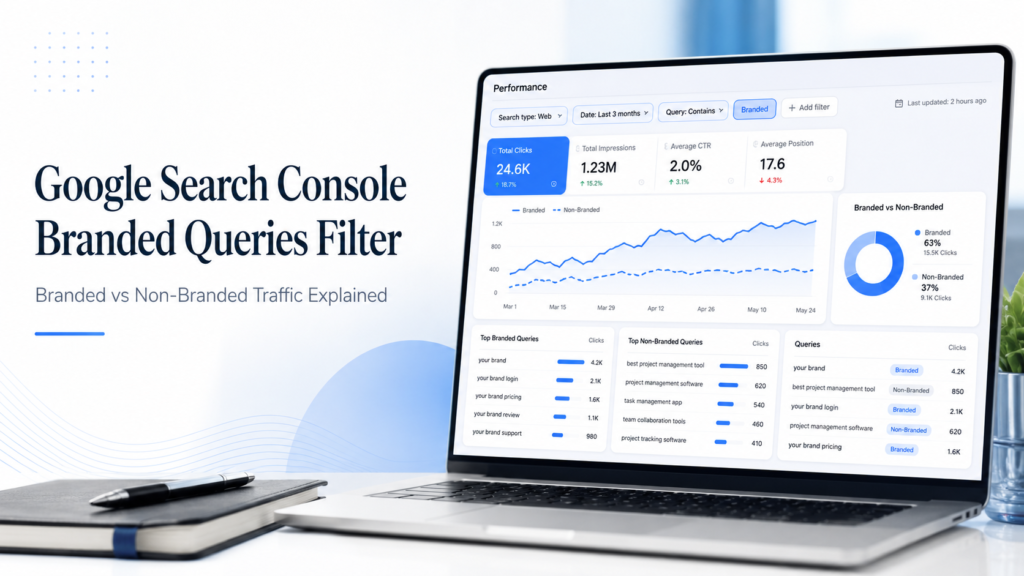
The Google Search Console branded queries filter separates Performance data into branded and non-branded searches. Google uses an AI-assisted classifier that can recognize brand names, variations, misspellings, languages, and some products or services associated with a brand. The feature changes reporting only; it does not improve rankings. It is available only to eligible properties and classifications can sometimes be wrong.
Need the steps?
Filter missing?
Classification looks wrong?
Still using regex?
Jump to what you need
1. What does the Google Search Console branded queries filter do?
The branded queries filter is a reporting feature inside Google Search Console that separates search performance into two broad groups:
- Branded queries: searches Google believes are connected to your brand.
- Non-branded queries: searches Google does not classify as brand-related.
That distinction helps answer a useful reporting question:
Is organic growth coming mainly from brand demand, or is Google also exposing the site to broader discovery searches?
Branded and non-branded queries can be compared using the same Search Console metrics you already use:
- Clicks
- Impressions
- Average CTR
- Average position
The feature does not change rankings. It changes how you analyze the data.
Google first announced the branded-query filtering feature in late 2025 and later expanded availability to eligible properties in 2026.
Primary source: Google Search Central — branded queries filter.
2. How to use the branded vs non-branded filter in Search Console
For an eligible property, the process is straightforward.
- Open Google Search Console.
- Select the property you want to analyze.
- Go to Performance → Search results.
- Open the Query filter.
- Choose the available branded or non-branded option.
- Compare clicks, impressions, CTR and average position.
- Switch to the Pages tab to see which URLs are attracting each type of search.
- Change the date range to compare current performance with a previous period where the branded split is available.
Do not stop at the sitewide graph. The page-level view is usually where the useful SEO diagnosis begins. A homepage may be heavily branded while a service page or informational guide is responsible for most non-branded discovery.
For deeper Search Console reporting workflows, see our Google Search Console configuration guide.
3. What does Google count as a branded query?
The native filter is more sophisticated than a simple “query contains company name” rule.
Google says its classifier can identify brand-related queries using signals such as:
- the brand name;
- spelling variants;
- misspellings;
- brand names in different languages;
- some products or services closely associated with the brand.
For Search Counsel Co., obvious branded searches could include terms such as:
- Search Counsel Co
- SearchCounselCo
- Search Counsel SEO
But Google may also recognize a brand relationship even when the exact business name is not present.
Important: Google’s branded/non-branded classification is its interpretation of the query. It is not necessarily identical to the branded-query definition your marketing team uses internally.
4. Why is the branded queries filter not showing in Search Console?
If you cannot see the branded-query option, that does not automatically mean Search Console is broken.
Check these points first.
| Check | Why it matters | What to do |
|---|---|---|
| Property type | The feature is tied to eligible properties rather than every possible sub-property setup. | Check whether you are viewing the appropriate top-level property. |
| Search volume | Very low-impression properties may not have enough data for classification. | Check again as the property gains more Search data. |
| Report | Not every Search Console view exposes the same filters. | Use Performance → Search results. |
| Insights availability | The branded/non-branded split may also appear in Search Console Insights. | Check Insights for the branded/non-branded card. |
Google’s current documentation says branded-query reporting is not available for every site and can depend on property eligibility and impression volume.
See: Google Search Console Help — Insights and branded queries.
What if the filter used to appear and then disappeared?
Users have reported this behavior in the Google Search Central Community. It may be related to available data or eligibility signals, but community observations should not be treated as an official guarantee. If the main Performance filter is missing, also check Search Console Insights and review Google’s current eligibility documentation.
5. Can you add or remove branded keywords from Google’s list?
Not currently.
Google does not currently provide a control that lets you manually train the native branded-query classifier by adding or removing specific brand terms.
That matters when Google’s idea of “branded” does not match yours.
For example, your internal reporting rules may want to:
- treat a founder’s name as branded;
- exclude a generic product name;
- track competitor brands separately;
- include abbreviations Google missed.
This is one of the strongest reasons regex remains useful.
6. How accurate is Google’s branded-query classifier?
Google itself warns that the classification may occasionally be wrong.
That is understandable because the system is attempting to infer brand relationships rather than matching only a literal string.
So do not automatically treat the native split as perfect ground truth.
A 5-minute accuracy check
- Apply the Branded filter.
- Open the visible query table.
- Check your most important branded variants manually.
- Look for obvious non-brand terms that Google included.
- Switch to Non-branded.
- Look for obvious brand terms Google missed.
- Compare the result with your existing brand regex if you have one.
Useful categories to inspect include:
- misspellings;
- abbreviations;
- founder or spokesperson names;
- product names;
- competitor names;
- multilingual variations.
Search Counsel Co. recommendation: use Google’s native classification as a fast reporting layer, then spot-check important queries before using the split for executive reporting or client decisions.
7. Native branded filter vs regex: which should you use?
The native filter does not make regex obsolete.
The better way to think about the two methods is:
Native filter = Google’s classification.
Regex = your controlled classification.
| Reporting need | Native GSC filter | Regex |
|---|---|---|
| Fast setup | Best | Requires setup |
| Automatic misspelling recognition | Strong | Must be specified |
| Different languages | Can identify them automatically | Must be defined manually |
| Exact control | Limited | Best |
| Remove false positives | Cannot directly edit | Best |
| Track competitor brands separately | Limited | Best |
| Property not eligible | Unavailable | Still usable |
| Audit Google’s classifier | Source being tested | Useful comparison |
When the native filter is usually enough
Use the native filter when you want a quick high-level split for routine SEO reporting and Google’s classifications look reasonable.
When regex is still better
Use regex when your reporting definition needs strict control, when Google’s classifier is wrong, when you need competitor-brand segments, or when the native feature is not available.
8. Why native branded-filter and regex totals may not match
It is completely possible for Google’s native branded/non-branded totals to disagree with your manual regex report.
That does not automatically mean one method is broken.
Common reasons include:
- Google recognizes terms your regex missed.
- Your regex includes terms Google considers non-branded.
- Google misclassified a query.
- Your manual definition of “brand” is intentionally different.
- Anonymized queries affect visible query totals.
- Search Console query tables do not expose every query row.
Anonymized queries are especially important
Google hides some individual query terms for privacy reasons. These anonymized queries can still be included in higher-level chart totals even though you cannot see them as normal rows in the query table.
That means:
Chart totals, visible query totals, native branded-filter totals and manually filtered query totals do not always reconcile perfectly.
If your Search Console query numbers appear to disappear or fail to match the graph, read our guide on why keywords disappear from Google Search Console.
9. How far back does branded-query data go?
This is one area where you should be careful with broad historical comparisons.
Google’s current help documentation discusses branded-query history, while the feature’s public announcement and later rollout updates occurred on a different timeline. Google representatives have also said that properties have a point from which classification begins.
Best practice: before building a year-over-year branded/non-branded report, check the earliest date your own Search Console property actually exposes under the branded filter. Do not assume the full 16-month Performance history is classified identically for every property.
This is particularly important if your reporting methodology previously relied on regex and you are switching to Google’s native classifier midway through the period.
10. How to interpret branded vs non-branded performance
The split is useful because branded and non-branded performance answer different questions.
But avoid one common overstatement:
Non-branded traffic is a useful proxy for search discovery, not proof that every searcher is a brand-new user.
Someone can already know your company and still search a generic service term. A branded search can also be influenced by SEO exposure earlier in the journey.
| Pattern | Likely interpretation | What to check next |
|---|---|---|
| Branded clicks up, non-branded flat | Brand demand may be increasing faster than organic discovery. | Service pages, informational coverage, search intent, internal links. |
| Non-branded impressions up, clicks flat | Google may be testing the site for more discovery queries, but rankings or SERP appeal are still weak. | Position, query intent, title, snippet, competing results. |
| Non-branded clicks up | Organic discovery is likely expanding. | Which pages and queries are driving the growth, and whether they convert. |
| Branded CTR drops | The brand SERP may have changed or users may be seeing stronger competing options. | Ads, competitors, SERP features, title/snippet, reputation results. |
| Both branded and non-branded decline | Potentially broader demand, technical, ranking or algorithmic issue. | Indexing, affected pages, technical health, algorithm updates, seasonality. |
If impressions are growing but clicks remain weak, see our low-CTR troubleshooting guide.
11. Branded Filter vs Search Console Insights vs Query Groups
These Search Console features answer different questions.
| Feature | Best for |
|---|---|
| Performance branded/non-branded filter | Detailed analysis of clicks, impressions, CTR, position, pages, countries, devices and date ranges. |
| Search Console Insights branded/non-branded card | Fast executive-level understanding of brand vs discovery performance. |
| Query Groups | Understanding clusters of semantically related searches and broader topic demand. |
| Regex | Custom segmentation, auditing, competitor-brand buckets and controlled definitions. |
Used together, these views can answer a much richer question:
Is the site gaining non-branded discovery—and which topic groups and pages are responsible for that growth?
12. How Search Counsel Co. validates branded vs non-branded reporting
We do not treat one blended organic-click number as the whole SEO story.
A practical branded/non-branded review should follow this order:
- Start with Google’s native branded filter.
- Spot-check the visible query classifications.
- Compare important terms with a controlled brand list or regex where needed.
- Review the page-level split.
- Compare current and previous periods.
- Separate impressions, rankings and clicks rather than treating them as the same signal.
- Document obvious classification anomalies before presenting the data as a final KPI.
That workflow matters because the most useful question is rarely just:
“Did organic clicks increase?”
A better question is:
Did search visibility expand beyond people already looking specifically for the brand—and which pages created that growth?
FAQ: Google Search Console branded queries filter
What is a branded query in Google Search Console?
A branded query is a search Google associates with your brand. It can include the brand name, misspellings, variations, different languages, and in some cases products or services strongly associated with the brand.
What is a non-branded query?
A non-branded query is a search Google does not classify as brand-related. These searches are useful for understanding broader organic discovery, although they do not guarantee that every searcher is a completely new user.
Why is the branded queries filter not showing?
The property may not be eligible, may have insufficient impression data, may be a sub-property that does not support the feature, or you may be checking a report where the filter is not available.
Can I add branded keywords manually?
Not currently. Google’s native branded-query classifier is not user-editable. If you need complete control, use a manual query filter or regex alongside the native feature.
Can Google classify branded queries incorrectly?
Yes. Google acknowledges that the classifier can occasionally misidentify queries. Important classifications should be spot-checked before they are used in executive or client reporting.
Should I still use regex?
Yes, in some situations. Regex remains useful when you need an auditable definition of branded traffic, want to include or exclude specific terms, need competitor-brand buckets, or want to validate Google’s native classifier.
Why do branded and non-branded totals not match my query table?
Search Console hides some individual queries for privacy, and visible query tables do not necessarily include every query row. Native classification and manual regex filters can also define branded terms differently.
Does the branded queries filter affect rankings?
No. It is a reporting feature. Changing the filter does not change how Google ranks the site.
Is non-branded traffic better than branded traffic?
Not inherently. Branded searches can show valuable brand demand, while non-branded searches can reveal wider organic discovery. Strong SEO reporting should understand both rather than treating one as universally better.
How far back does the branded filter work?
Do not assume the full Search Console history is classified identically for every site. Check the earliest branded/non-branded date visible in your own property before building historical comparisons.
Primary sources
| Source | Used for |
|---|---|
| Google Search Central — Branded Queries Filter | Feature definition, classification, rollout, availability and classifier limitations. |
| Google Search Console Help — Insights | Branded/non-branded Insights reporting, eligibility and classification guidance. |
| Google Search Console Performance Report | Clicks, impressions, CTR, average position and Performance-report behavior. |
| Google Search Central — Performance Data Deep Dive | Filtering, anonymized queries and why visible query totals may differ from chart totals. |
Final takeaway
The Google Search Console branded queries filter solves a real reporting problem, but it should not be treated as perfect or self-explanatory.
Use the native filter because it is fast and can recognize more brand variations than a simple text match.
Verify it because Google’s classifier can make mistakes.
Keep regex available when your reporting methodology needs strict control.
And most importantly, interpret the branded/non-branded split alongside pages, impressions, rankings, CTR and business outcomes rather than treating one number as proof that SEO is succeeding or failing.
If Search Console shows that non-branded visibility is weak but the reason is unclear, continue with our content audit guide, technical SEO guide, or search intent guide.
Editorial note: Search Console features and eligibility rules can change. This guide prioritizes Google’s current documentation and distinguishes official product behavior from community observations. Recheck Google Search Console Help before making long-term reporting assumptions.