How to Recover From the March 2026 Google Core Update
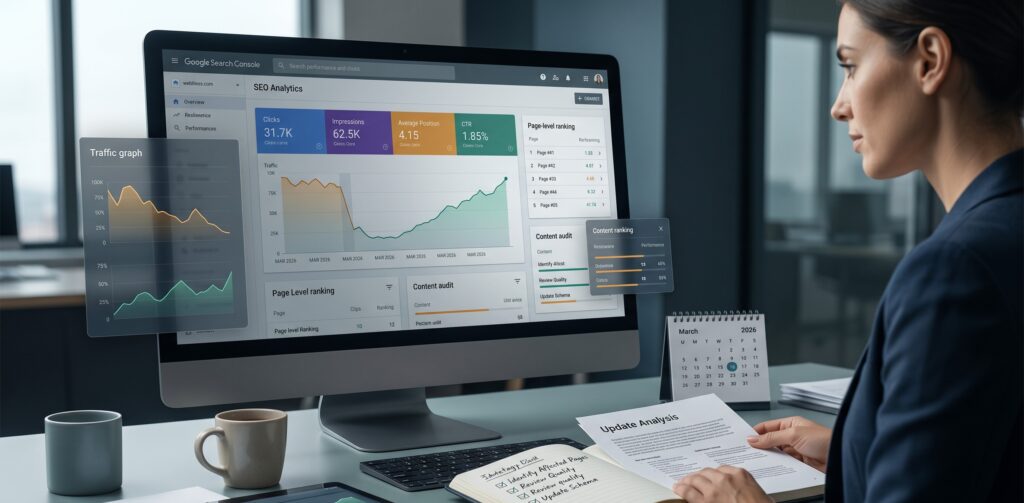
Quick answer: If your traffic dropped after the March 2026 Google core update, do not changing your whole website. Start with Google Search Console. Check which pages dropped, which keywords changed, and whether the real issue is clicks, impressions, CTR, or average position. Once you know that, the next step becomes much clearer.
The March 2026 Google core update ran from March 27 to April 8, 2026, according to the Google Search Status Dashboard. If your rankings or traffic changed around that time, the update may be part of the reason. But that does not mean your website was punished. That is not always how core updates work.
Sometimes Google looks at the same group of pages again and decides that another page is now a better fit for the search. That can feel frustrating, especially if your page was doing well before. Still, the best move is not to panic. Look at the data first. Then fix what actually needs fixing.
If you are still trying to understand the drop itself, you can also read our related guide on why your website traffic dropped after the March 2026 Google core update.
What Was the March 2026 Google Core Update?
A core update is a broad change in how Google ranks search results. It is not the same thing as a manual penalty. Google explains in its core update guidance that site owners should focus on making helpful, reliable improvements instead of looking for one quick technical trick.
It is more like Google is reviewing search results across many topics and deciding which pages seem more useful for people now.
That is why a page can lose traffic even when nothing on the page changed. Maybe the content is still decent. Maybe it still answers part of the question. But another page may now answer the search better, explain the topic more clearly, or match the search intent more closely.
So recovery is not about tricking Google. It is about making the affected pages more useful than they were before.
First, Check If the Update Really Affected You
Do not judge everything from one bad day. Every site has strange days. Traffic moves up and down. Tracking can also look odd sometimes.
Open Google Search Console and look for a real pattern. A few signs can help:
- Clicks dropped after the update period.
- Impressions went down on important pages.
- Average position dropped for keywords you care about.
- One part of the site dropped more than the rest.
- Non branded searches dropped more than branded searches.
If you see those signs, then yes, the update may have affected your site. If the drop started before the update, or only happened for one day, you need to be more careful before blaming the core update.
It is also worth checking the Search Console data anomalies page. Sometimes a reporting issue can make impressions or clicks look different from normal, and you do not want to confuse a data issue with a real ranking drop.
Compare the Right Dates in Search Console
This is where many people make mistakes. They compare a random week with another random week and then make a big decision from messy data.
For this update, it is better to compare a clean period after April 8 with a clean period before March 27. Try not to compare against holidays, sale days, ad campaigns, or anything unusual.
Google’s guide on debugging Search traffic drops is useful here because it explains why traffic drops can come from different causes, not only ranking loss.
Then look at these numbers one by one:
- Clicks: Did fewer people come to your site from Google?
- Impressions: Did Google show your pages less often?
- CTR: Did people see your result but click less?
- Average position: Did your rankings actually move down?
This matters because a traffic drop can happen for different reasons. If impressions dropped, the page may have lost visibility. If impressions stayed close but clicks dropped, the issue may be your title, meta description, or the way the search result looks now.
If the data feels confusing, an SEO recovery audit can help you slow down and understand what actually dropped before making changes.
Find the Pages That Dropped
Do not only look at the whole site graph. That graph can make everything look worse than it is.
Go to the Pages report in Search Console. Find the URLs that lost the most clicks or impressions. Then click one page and check the queries for that page.
This gives you a much better view. You may find that only three or four pages caused most of the traffic loss. In that case, you do not need to rewrite the whole site. You need to work on those pages first.
Understand What Kind of Drop You Have
Before editing anything, slow down and read the pattern.
| What You See | What It May Mean | What to Check |
|---|---|---|
| Clicks and impressions both dropped | The page may have lost ranking visibility. | Check position, intent, and pages now ranking above you. |
| Impressions stayed close but clicks dropped | People may be seeing your result but not clicking. | Check title tags, meta descriptions, and search result layout. |
| Only a few pages dropped | The issue may be page specific. | Check content, freshness, and internal links. |
| The whole site dropped | The issue may be wider. | Check technical SEO, content quality, and site structure. |
This simple check can save a lot of wasted work. Some people see a drop and start changing everything. That usually makes the situation harder to understand.
If impressions are still there but clicks dropped, review your titles, meta descriptions, headings, and page structure. That is where on page SEO work can help make the page clearer for both users and search engines.
Check Search Intent Again
Search intent just means what the person really wants when they type a query into Google.
After a core update, this can change. Not always, but it happens. Your page may not be bad. It may just be slightly out of line with what Google now thinks people want for that search.
Search your main keyword and look at the results. Are the top pages long guides, short answers, service pages, product pages, tools, videos, or forum posts?
Then look at your page and ask:
- Does the page answer the main question quickly?
- Is the content too broad?
- Is anything old or thin?
- Are common questions missing?
- Would a real reader feel helped after reading it?
If the answer is no, that is probably where the work starts.
Improve the Pages That Actually Matter
You do not need to update every page at once. Start with the pages that lost traffic and still matter for leads, sales, or visibility.
Also, do not just make the page longer. Longer is not always better. A page can be long and still feel empty.
Google’s own page on creating helpful, reliable, people first content is a good reference here. It points the work back to the reader, not just to rankings.
Try this instead:
- Rewrite the opening so the answer comes faster.
- Add missing sections that readers would expect.
- Update old examples, screenshots, facts, or advice.
- Add FAQs if people keep asking the same questions.
- Remove repeated paragraphs.
- Add a small table or checklist if it makes the page easier to use.
- Make headings clearer.
The goal is simple. Make the page easier to read and more useful than it was before.
If many pages feel thin, outdated, or disconnected from the rest of the site, the issue may be bigger than one blog post. In that case, a clearer content strategy can help decide what to update, merge, rewrite, or support with better internal links.
Check Basic Technical Problems Too
A core update is usually not only a technical issue. Still, technical problems can slow recovery.
Check the basics:
- Important pages are indexed.
- No important page has a wrong noindex tag.
- Canonical tags point to the right URL.
- Your sitemap is clean.
- Internal links are not broken.
- Pages work properly on mobile.
- Very similar pages are not competing with each other.
If the whole site dropped, this part matters more. One template issue or indexing mistake can affect many pages at once.
If important pages are not being crawled and indexed properly, a technical SEO review should be part of the recovery work.
Use Internal Links Better
Internal links help both Google and readers. They show which pages are connected and which pages are important.
If an important page dropped, check how many useful internal links point to it. Maybe the page is buried too deep. Maybe related blogs do not link to it. Maybe the anchor text is not clear.
Add links from strong related pages where it feels natural. Do not force the same keyword everywhere. Just link in a way that helps the reader move to the next useful page.
What Not to Do After the March 2026 Core Update
A few things can make the mess worse. Try to avoid these:
- Do not delete pages only because traffic dropped.
- Do not rewrite the whole site without checking data.
- Do not assume every drop is a penalty.
- Do not stuff keywords into old content.
- Do not copy the pages ranking above you.
- Do not make too many changes at the same time.
Small, clear changes are easier to track. Big random changes are not.
March 2026 Core Update Recovery Checklist
- Confirm when the traffic drop started.
- Check the official update dates on the Google Search Status Dashboard.
- Wait for cleaner data after the update finished.
- Compare the right dates in Search Console.
- Check the Search Console data anomalies page if impressions or clicks look unusual.
- Find the pages with the biggest losses.
- Check which queries dropped.
- Look at clicks, impressions, CTR, and position separately.
- Review search intent for the main keywords.
- Fix weak content sections first.
- Update old information.
- Add useful FAQs, examples, or a table if needed.
- Check indexing and technical SEO basics.
- Add better internal links to important pages.
- Watch the data over the next few weeks.
When an SEO Recovery Audit Makes Sense
If the drop is small, you may only need a few focused updates. That happens.
But if leads dropped, important pages lost rankings, or the whole site looks affected, it is worth doing a deeper review. A good SEO recovery audit should show what dropped, which queries changed, what type of issue you are dealing with, and what should be fixed first.
If your traffic dropped after the March 2026 Google core update, contact SearchCounselCo. We can review your Google Search Console data, find the affected pages, and help you plan the next steps without guessing.
FAQs About March 2026 Google Core Update Recovery
Was my site penalized by the March 2026 core update?
Usually, no. A core update is not the same as a manual penalty. Google’s core update documentation explains that broad updates are about improving how systems assess content overall, not handing out a manual action to every site that drops.
How long does recovery take?
It depends on the site and the problem. Some pages may show movement in a few weeks. Bigger recovery can take longer because Google needs time to crawl and reassess the changes.
Should I delete old blog posts?
Not right away. First check whether the page can be improved, merged with another page, or updated. Deleting should be the last option.
What should I check first after a traffic drop?
Start with Google Search Console. Compare dates, find affected pages, check dropped queries, and see whether clicks, impressions, CTR, or position changed the most. Google’s traffic drop debugging guide is useful if you want to separate ranking loss from other causes.
Can technical SEO affect recovery?
Yes. Even when the main issue is content, technical problems can make recovery harder if Google cannot crawl, index, or understand your pages properly.
Final Thoughts
Recovering from the March 2026 Google core update starts with staying calm and reading the data properly. Do not change everything at once. Find what dropped, understand why it dropped, and work on the pages that matter most.
Most recovery work starts with simple things. Clearer content. Better intent match. Stronger internal links. Fewer technical mistakes. Then you keep watching the data and adjust from there.