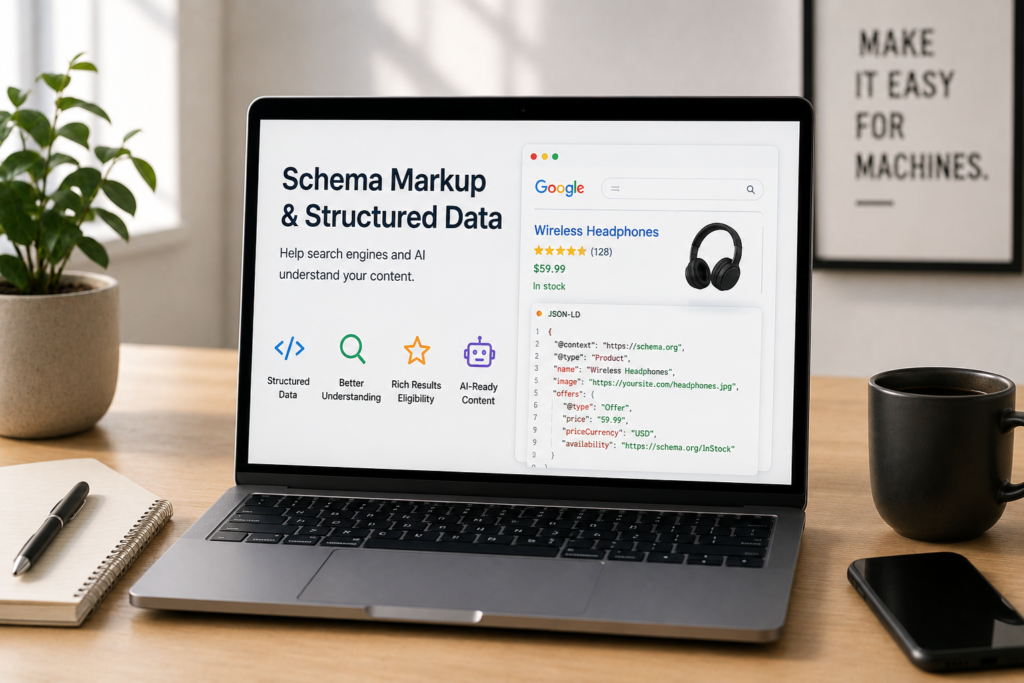
On-Page SEO Guide
On-Page Schema Markup: Helping Search Engines and AI Understand Your Page
Schema markup is code that tells search engines and AI what your content means, not just what it says. It used to be about winning rich results. In 2026 its bigger job is helping machines trust, understand, and cite you.
By Rahul Saini, Author at Search Counsel Co. Last updated [July] 2026.
Featured answer: what is schema markup?
Schema markup is structured-data code, usually written in JSON-LD, that labels the elements of a page using the Schema.org vocabulary so search engines and AI can understand them. It isn’t a direct ranking factor, but it makes pages eligible for rich results, helps Google recognize your entities, and increasingly influences whether AI engines trust and cite your content.
The Code
JSON-LD
Google’s recommended format, kept separate from your HTML.
The Job
Machine clarity
Tells engines what your content means, not just what it says.
The 2026 Shift
AI trust signal
Schema now helps AI verify and cite you, not just display features.
The Rule
Visible only
Never mark up content that users can’t see on the page.
If you searched “schema markup,” you want to know what to add, what still earns rich results after Google’s recent changes, and how to do it right. Here’s all of it. This guide covers what schema is, whether it affects rankings, the 2026 shift in what it’s for, the types that matter, how to add and test it, and how it now feeds AI. It’s where your semantic SEO and extractable content get spelled out in a language machines read directly.
Jump to what you need
Article note: Written by Rahul Saini at Search Counsel Co., based on schema implementation we run for client sites. Format and guideline points come from Google’s structured data documentation; the rich-result changes and AI-trust findings reflect current studies, listed near the end and checked at the time of writing.
1) What is schema markup?
Three terms get used interchangeably, and they shouldn’t. Structured data is the broad idea of organizing information in a machine-readable format. Schema markup is the specific vocabulary for doing that, defined at Schema.org and shared across Google, Bing, and others. JSON-LD is the code format Google recommends for writing it.
In plain terms, schema labels the parts of your page. It tells a search engine “this is the author,” “this is the publish date,” “this is a step in a recipe,” so the machine understands the meaning behind your words. JSON-LD keeps that labeling in a separate script block, apart from your visible HTML, which makes it easy to add, template, and maintain. Microdata and RDFa are older formats that weave markup into your HTML; they still work, but there’s no reason to choose them for a new site.
2) Is schema markup a ranking factor?
No, not directly, and Google has been consistent about that. Adding schema won’t lift your position by itself. What it does is enable things that matter around ranking: eligibility for rich results, clearer understanding of your content, entity recognition in the Knowledge Graph, and, increasingly, trust signals AI engines use. It sits alongside the other ranking factors rather than among them.
The click-through effect is real. Rich results, the enhanced listings schema can produce, stand out and get clicked more. Nestlé measured pages shown as rich results getting an 82% higher click-through rate than non-rich listings. So schema is a lever for visibility and clicks, and now for AI citations, even though it’s not a ranking factor in the strict sense.
3) Rich results and the 2026 shift
This is the part most older guides get wrong. Schema used to be mostly about winning rich results, those star ratings, FAQ dropdowns, and breadcrumb trails in the SERP. Google has steadily narrowed which ones show. FAQ rich results are now limited to authoritative government and health sites, so a typical business won’t get FAQ dropdowns no matter how clean the markup. HowTo rich results were deprecated. A 2026 update trimmed these further.
But the value of schema didn’t fall, it moved. The shift is from schema as a display trigger to schema as an AI trust and entity signal. Google’s AI systems read structured data to verify claims, resolve who or what a source is, and judge credibility when building an answer, which can earn you a citation even when no rich result appears. In one controlled experiment, of three near-identical pages, only the one with clean schema was cited in an AI Overview and ranked well, while the version with no schema failed to index at all. So you still add FAQ and HowTo schema, not for the dropdown, but so machines understand and can extract your content.
the click-through lever
Invisible: entity + AI understanding
the AI-citation and Knowledge Graph lever
4) The schema types that matter
Schema.org has hundreds of types, but a handful cover most real needs. Discipline beats volume: a few accurate blocks outperform fifty half-built ones.
| Type | What it’s for |
|---|---|
| Organization | Your brand as an entity: name, logo, and sameAs links. The foundation for most sites. |
| Article / BlogPosting | Editorial content, with author, publish and modified dates, and publisher. |
| BreadcrumbList | Your page’s position in the site hierarchy, still a supported rich result. |
| FAQPage | Question-and-answer blocks. Rare as a rich result now, but useful for AI extraction. |
| Product | Ecommerce pages, with price, availability, and ratings (needs required properties). |
| LocalBusiness | Physical locations, with address, hours, and contact details. |
For most content sites, the foundational set is Organization, BreadcrumbList, and the right content type (Article), plus FAQPage where it fits. Start there and add more only when a specific rich result genuinely matches your content.
5) How to add schema markup
The cleanest method is a JSON-LD block in the page head. Here’s a minimal Article example:
<script type=”application/ld+json”>
{ “@context”: “https://schema.org”, “@type”: “Article”,
“headline”: “Your title”, “author”: { “@type”: “Person”, “name”: “Author Name” },
“datePublished”: “2026-01-01” }
</script>
A few practical notes. Most people add schema through a CMS plugin like Yoast or Rank Math, which generates it for you; you can also hand-code it or deploy through a tag manager, though tag-manager schema needs extra testing because it renders through JavaScript. Multiple JSON-LD blocks on one page are fine, and you can nest related entities in a single block using an @graph array, connecting them with @id references. If your CMS makes JSON-LD impractical, that’s the main case for older formats. For deeper, site-wide implementation, this crosses into technical SEO.
6) Google’s structured data rules
Google’s guidelines are strict, and breaking them can trigger a manual action. The essentials:
- Mark up only visible content. If it’s not on the page for users to see, don’t put it in your schema. Marking up hidden content is treated as spam and sits firmly in black-hat territory.
- Match the page exactly. The schema must describe the actual content. Don’t describe a performer, product, or review that isn’t there.
- Be complete. Include the required properties for your type. Partial markup, like Product schema missing its rating, produces no rich result at all.
- Be accurate and honest. No fake reviews, no misleading or irrelevant markup, no impersonation.
- Use the most specific type. Pick the closest Schema.org type and property names for your content, and put the schema on the page it describes.
7) How to test and monitor
Never deploy schema without validating it. Two tools, two jobs.
- Rich Results Test. Google’s tool shows which rich results your markup is eligible for and previews them. Use its URL mode for schema injected by JavaScript or a tag manager, since code-snippet mode won’t run it.
- Schema Markup Validator. The Schema.org validator checks your markup against the spec, catching issues that don’t affect Google but might affect other engines.
- Search Console. After deploying, watch the Enhancement and rich-result reports in Google Search Console to catch errors across your live pages over time.
Watch out: beware “schema drift,” when your visible content changes but the JSON-LD doesn’t, so a page shows last month’s price or a departed author. The fix is structural: generate your schema from the same data source that fills your visible content, so the two never disagree. Add a schema check to every content refresh.
8) Schema for AI and entities
This is why schema matters more now, not less. Structured data gives AI engines machine-readable context about your entities, attributes, and relationships, which they use to interpret and reference you reliably. Clean schema helps an AI confidently resolve who you are, and sources it can resolve get cited more often.
Two moves have the highest impact. First, use Organization and Person schema with sameAs links to your authoritative profiles, Wikidata, LinkedIn, and the like, to strengthen how Google recognizes your brand as an entity, the schema side of the entity work that gates AI visibility. Second, mark up FAQ and Q&A sections so each pair is a labeled, extractable unit, which supports the extractable content that wins citations. Together these feed your wider AI search optimization, and they reinforce the trust signals AI weighs when choosing sources. Our guide to schema for AI citations goes deeper on that specific angle.
9) Common schema mistakes
The errors that waste the effort or cause harm.
- Marking up invisible content. The fastest way to a manual action. Only mark up what’s on the page.
- Incomplete markup. Missing required properties means no rich result. Complete it or skip it.
- Wrong type. Tagging a category page as Product, or a blog as something it isn’t. Use the accurate type.
- Schema drift. Stale prices, dates, or authors in the JSON-LD after the page changed. Generate from live data.
- Chasing dead rich results. Building FAQ or HowTo markup expecting dropdowns that no longer show for most sites. Add them for understanding, not display.
- Never validating. Deploying without the Rich Results Test, then wondering why nothing shows.
10) Sources used for this guide
This guide leans on Google’s documentation and current structured-data research.
| Source | What it supports |
|---|---|
| Google Search Central structured data documentation | JSON-LD as recommended, the visible-content and completeness rules, and the Nestlé 82% CTR case. |
| Google rich-result eligibility changes (FAQ, HowTo) | FAQ limited to authoritative sites and HowTo deprecation. |
| Search Engine Land schema experiment (2025) | A well-implemented schema page appearing in an AI Overview where a no-schema page didn’t index. |
| 2026 structured-data analyses (AI trust, entity schema) | The shift to schema as an AI trust signal and the value of sameAs entity disambiguation. |
FAQ: schema markup
What is schema markup?
Schema markup is structured-data code, usually JSON-LD, that labels the parts of a page using the Schema.org vocabulary so search engines and AI understand them. It marks things like the author, date, product, or FAQ, helping machines grasp what your content means rather than just reading the words.
What is the difference between structured data and schema markup?
Structured data is the broad concept of machine-readable information. Schema markup is the specific vocabulary, defined at Schema.org, used to write it. JSON-LD is the code format Google recommends for implementing schema markup. People use the terms loosely, but they’re distinct layers.
Is schema markup a ranking factor?
No, not directly. Google has said schema isn’t a ranking factor. It matters because it makes pages eligible for rich results, helps Google understand your content and entities, and now serves as a trust signal AI engines use when deciding what to cite, all of which support performance indirectly.
What is JSON-LD?
JSON-LD is the structured-data format Google recommends. It places your schema in a separate script block, apart from your visible HTML, which makes it easy to add, template, and maintain. It’s preferred over the older Microdata and RDFa formats for new sites.
Which schema types should I use?
For most sites, start with Organization, BreadcrumbList, and the right content type such as Article, plus FAQPage where it fits. Product and LocalBusiness matter for ecommerce and physical locations. Add more only when a specific rich result genuinely matches your content.
Does FAQ schema still work in 2026?
FAQ rich results are now limited mostly to authoritative government and health sites, so most businesses won’t get FAQ dropdowns in search. FAQPage schema is still worth adding, though, because it helps search engines and AI understand and extract your question-and-answer content.
How do I test my schema markup?
Use Google’s Rich Results Test to see which rich results your markup is eligible for and to preview them, and the Schema.org Markup Validator to check the markup against the spec. After deploying, monitor the Enhancement reports in Google Search Console for errors on live pages.
Conclusion: label your page for the machines
Schema markup is how you hand search engines and AI a clean description of your page instead of making them guess. Write it in JSON-LD, mark up only what’s really there, start with the foundational types, validate before you publish, and keep it in sync with your content. The rich-result payoff has narrowed, but the bigger one has grown: schema is now how machines confirm who you are and decide whether to cite you.
That completes the on-page toolkit. To bring it together, revisit how entities make you legible to search in semantic SEO, structure pages to be quoted in our extractable content guide, or return to the complete guide to on-page SEO.
Editorial note: This guide is for general marketing education. Rich-result eligibility and supported schema types change, so check Google’s current structured data documentation before investing heavily in a specific type, and validate every implementation.