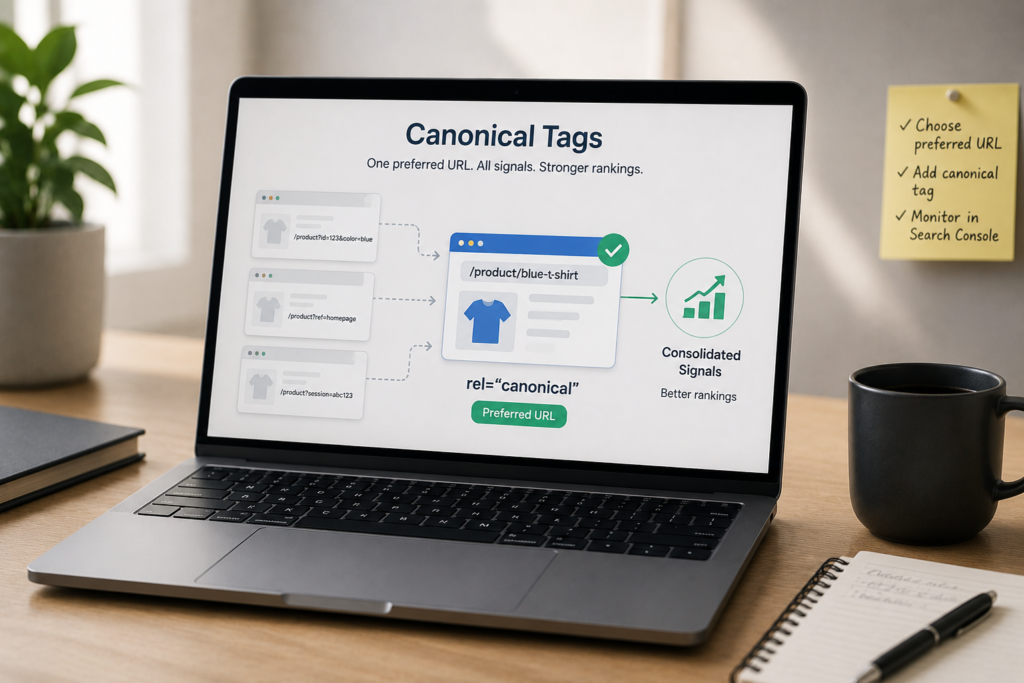
Technical SEO Guide · Updated September 2026
Canonical Tags and Duplicate Content: How to Choose the Right URL
Canonical tags help search engines understand which URL should represent a set of duplicate or very similar pages. They are powerful, but they are not a command: Google combines your canonical declaration with redirects, sitemap inclusion, internal linking, HTTPS, content similarity, and other signals before selecting a canonical URL.
<link rel="canonical"> element placed in the HTML <head> that identifies the preferred URL for duplicate or very similar content. Google describes rel="canonical" as a strong canonicalization signal, but it can still select a different URL when other signals conflict.
Canonical tags and duplicate content: what actually happens?
Duplicate content is not automatically a spam violation. Google says some duplication is normal. The practical problem is that search engines still need to choose one representative URL from a group of duplicate or near-duplicate pages. That selection process is canonicalization.
If your site exposes the same page through a clean URL and several parameter URLs, Google may cluster those URLs together and select one as the canonical. The canonical page is generally the version shown in search results and the primary version Google uses when evaluating the clustered content.
Canonicalization can also help consolidate signals associated with duplicate URLs, simplify reporting, and reduce unnecessary crawling of duplicate versions. Google explicitly lists these as reasons to specify a canonical URL.
How to implement a canonical tag correctly
For an HTML page, place one canonical link element in the document head:
<link rel="canonical" href="https://www.example.com/preferred-page/" />Google recommends using an absolute URL and recommends a self-referencing canonical on the canonical page itself.
A clean implementation should satisfy these checks
- The canonical appears in the valid HTML
<head>. - The target is the URL you genuinely want indexed and shown in Search.
- The target normally returns a successful response and is crawlable.
- Internal links point to the canonical URL rather than duplicate variants.
- The XML sitemap lists the canonical URL, not competing duplicates.
- JavaScript does not replace a different canonical from the one delivered in the original HTML.
Self-referencing canonical
A self-referencing canonical points from a page to its own preferred URL. Google recommends this on canonical pages. It is especially useful when the same content can be reached with tracking parameters or other accidental URL variants.
Canonical HTTP header for non-HTML files
For formats such as PDFs, a canonical can be supplied in the HTTP response header rather than an HTML head:
Link: <https://www.example.com/guide/>; rel="canonical"Google supports the HTTP-header method for web search and recommends choosing one canonical-delivery method consistently when possible.
How Google chooses a canonical URL
Your declared canonical is influential, but it is not the only input. Google’s current documentation lists redirects and rel="canonical" as strong signals and sitemap inclusion as a weaker signal. Google also considers site-level signals such as HTTPS and the broader relationship between duplicate pages.
| Signal | What it communicates | Practical action |
|---|---|---|
| Permanent redirect | The source URL has moved and the target should replace it. | Use when the duplicate URL no longer needs to remain a separate destination. |
rel="canonical" | This URL is your preferred representative for duplicate or very similar content. | Use on duplicate pages that still need to remain accessible. |
| XML sitemap | These are the URLs you consider canonical and important. | List canonical, indexable URLs only. |
| Internal links | Your site architecture repeatedly reinforces a preferred URL. | Link directly to the canonical URL. |
| HTTPS | Google generally prefers secure equivalents when signals are otherwise consistent. | Redirect HTTP to HTTPS and keep canonical signals aligned. |
If Google selects a different canonical than the one you declared, do not simply add more canonical tags. First inspect whether your redirects, internal links, sitemap, page content, and canonical element are sending mixed signals.
Canonical vs 301 redirect vs noindex vs robots.txt
The fastest way to choose the right control is to ask two questions: Should users still be able to open this URL? and Should this URL be eligible to appear independently in search?
| Method | Best use | What not to expect |
|---|---|---|
| Canonical | Duplicate or very similar URLs that must stay accessible. | It does not force Google to choose the target. |
| 301/308 redirect | A duplicate or old URL should permanently resolve to another URL. | Users cannot keep using the source as a separate page. |
| noindex | A page should remain usable but should not appear in Google Search. | Google does not recommend noindex as a method for choosing a canonical inside your site. |
| robots.txt disallow | Control crawling of URL patterns when blocking is appropriate. | It is not a canonicalization method and does not reliably remove a URL from the index. |
noindex.
Common duplicate URL scenarios and the right response
1. Tracking parameters
If /guide/ and /guide/?utm_source=newsletter display the same content, keep the clean URL as the canonical. Also make your internal links point to the clean version.
2. HTTP and HTTPS
For equivalent HTTP and HTTPS pages, redirect HTTP to HTTPS and keep the HTTPS version self-canonical. Google generally prefers HTTPS, but conflicting signals can still create problems.
3. WWW and non-WWW
Choose one hostname, redirect the alternate hostname to it, and use the selected host consistently in canonicals, internal links, and sitemaps.
4. Pagination
Do not automatically canonicalize every paginated URL to page 1. Paginated pages usually contain different items and should normally use their own canonical URL. Also make sure crawlable links connect the pages so Google can discover deeper content.
5. Ecommerce variants and filters
Whether a variant or filtered page should canonicalize to a parent page depends on whether it has standalone value and distinct search intent. That is a deeper ecommerce decision, so use the dedicated duplicate content and canonicalization in ecommerce guide rather than applying one rule to every store URL.
6. Syndicated or republished articles
Do not assume a cross-domain canonical will solve every syndication problem. Google’s current troubleshooting guidance says canonicalization is not the recommended method when the goal is to prevent a syndication partner’s copy from appearing in Search. If controlling search visibility of the partner copy matters, work with the publisher on indexing controls and attribution rather than relying on canonical alone.
7. PDFs and alternate file formats
When the same document exists as HTML and PDF, an HTTP Link header can declare a preferred canonical for the non-HTML version. Confirm that your server actually returns the intended header.
Canonical mistakes that create mixed signals
- Canonical chains: A points to B, while B points to C. Point directly to the final preferred URL.
- Canonical to an error or redirect: the canonical target should be the final preferred resource, not an intermediate or broken URL.
- Multiple conflicting canonical declarations: theme, plugin, HTTP header, and custom code can accidentally disagree.
- Canonical in the body: Google accepts the canonical link element in the HTML head, not as an arbitrary body element.
- Relative canonical URLs: Google supports them, but recommends absolute URLs because they reduce implementation risk.
- Internal links to non-canonical variants: this undermines the URL preference you are trying to communicate.
- Sitemap and canonical disagreement: do not list one URL in the sitemap while declaring another as canonical.
- Changing canonicals with JavaScript: Google’s current guidance is to keep the source HTML canonical and rendered canonical consistent.
- Canonicalizing pages that are not actually duplicates: canonicalization is not a shortcut for merging unrelated ranking signals.
How to troubleshoot canonical problems in Google Search Console
- Inspect the affected URL. Compare the user-declared canonical with the Google-selected canonical in URL Inspection.
- Check whether Google’s choice makes sense. Sometimes the selected URL is the cleaner or more useful version.
- Audit technical signals. Check redirects, canonical tags, status codes, sitemap inclusion, HTTPS, hreflang where relevant, and internal links.
- Compare the page content. A canonical only makes sense when the pages are duplicates or very similar. If two URLs serve genuinely different intent, they may deserve separate indexable pages.
- Fix the conflict, then recheck. Update the underlying implementation and allow Google time to recrawl and reprocess the cluster.
Duplicate without user-selected canonical means Google found duplicates but you did not clearly specify the preferred URL.
Duplicate, Google chose different canonical than user means you declared one URL but Google selected another. Treat that as a signal to inspect the whole canonical cluster, not just the tag.
For a wider indexing diagnosis, see the Search Counsel Co. guide to fixing indexing problems. For the broader architecture context, use the technical SEO guide.
A practical canonical audit checklist
| Check | Pass condition | Why it matters |
|---|---|---|
| Canonical count | One intended canonical declaration per HTML page. | Avoids conflicting preferences. |
| Target status | Preferred URL resolves directly and is usable. | Prevents chains and broken targets. |
| Indexability | Canonical target is intended for indexing. | A canonical should point at the representative page you want in Search. |
| Internal links | Important internal links use the canonical URL. | Reinforces one URL throughout site architecture. |
| Sitemap | Only the preferred canonical URL is listed. | Prevents mixed canonical signals. |
| Source vs rendered HTML | Canonical is consistent before and after rendering. | Reduces ambiguity in JavaScript sites. |
| Duplicate similarity | Canonicalized pages are duplicate or very similar. | Avoids consolidating unrelated intent. |
| Search Console | Google-selected canonical matches the intended URL where appropriate. | Verifies Google’s observed cluster decision. |
For large sites, crawl at scale with a tool that exports canonical source, target, response status, indexability, and inlinks. Then segment by template or URL pattern instead of fixing isolated pages one at a time.
What canonical tags do not guarantee
A canonical tag does not guarantee ranking, indexing, traffic, or AI citation. It also does not fix weak content, poor internal architecture, or unrelated pages competing for the same query. Canonicalization is a technical consolidation signal. It works best when the page itself is useful and every surrounding URL signal supports the same choice.
For AI search visibility, the safest principle is the same one Google documents for Search: publish a clear preferred URL, make the page crawlable, avoid contradictory duplicate versions, and provide content worth citing. Claims that a canonical tag by itself makes an AI system cite a particular page are not currently verifiable.
FAQ: canonical tags and duplicate content
Is duplicate content a Google penalty?
Duplicate content on a site is not automatically a spam violation. Google commonly clusters duplicate or very similar URLs and chooses a representative canonical. Problems arise when the wrong URL is selected, signals conflict, or duplicate URLs waste crawling and reporting effort.
Should every page have a self-referencing canonical?
Google recommends a self-referencing canonical on canonical pages. It is a useful default for indexable pages, provided the URL truly is the preferred version.
Can Google ignore my canonical tag?
Yes. A canonical declaration is a strong signal, not an absolute rule. Google can select a different URL when other signals or the page relationship point elsewhere.
Should I canonicalize all pagination to page 1?
No. Paginated URLs normally contain different sets of items and should generally be independently crawlable with their own canonical URL rather than all pointing to the first page.
Can I use robots.txt instead of a canonical?
No. Google explicitly says not to use robots.txt for canonicalization. A blocked URL can still be known or indexed without its content being crawled.
Should I use noindex and canonical together?
Use each directive for its intended job. Google specifically recommends rel="canonical", not noindex, when your goal is to choose a canonical within your own site.
What if Google chooses a different canonical?
Use URL Inspection, then check whether redirects, sitemap entries, internal links, HTTPS, hreflang, duplicate similarity, and the canonical declaration all support the same preferred URL. Fix conflicting signals rather than repeatedly changing only the tag.
Primary sources
Editorial note: This guide is educational. Canonicalization behavior can change, so confirm time-sensitive implementation decisions against current Google Search Central documentation and your own Search Console data.