SEO Analytics & Reporting
Google Search Console Platform Properties let you measure how public content from Instagram, TikTok, X and YouTube is discovered through Google. Connecting an account is relatively simple. The harder part is understanding what the reports actually count, why new properties can look empty, why Insights numbers may not match, what happens when authorization expires, and how to turn the data into useful content decisions.
Last verified September 4, 2026 against current Google Search Console documentation.
Quick answer
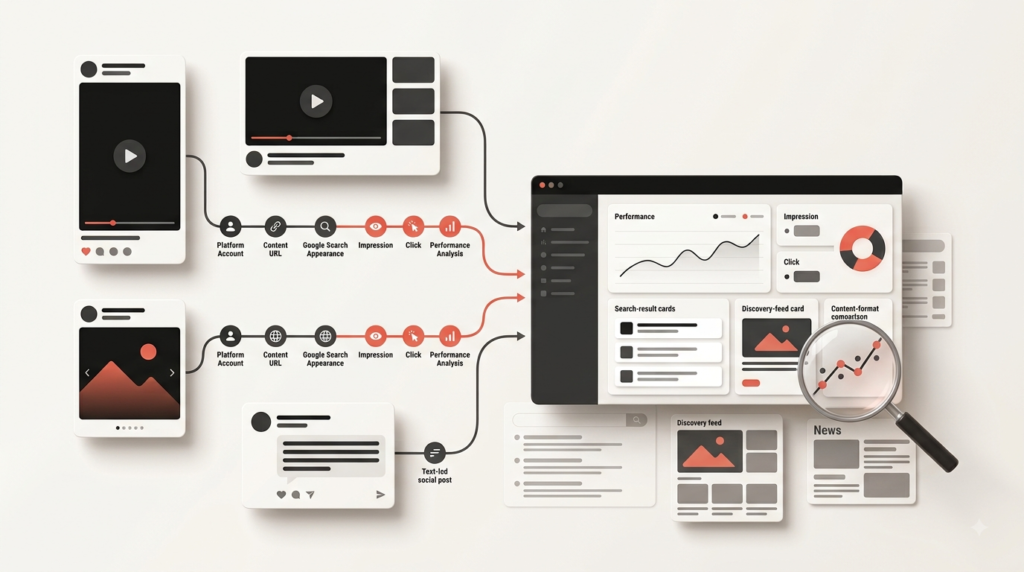
A Google Search Console Platform Property is a Search Console property connected to a supported Instagram, TikTok, X or YouTube account or channel. It reports how that account's public content performs when discovered through Google, including metrics such as clicks, impressions, CTR, average position, content URLs, queries, countries, devices and dates. It does not replace Instagram Insights, TikTok Analytics, X Analytics or YouTube Analytics because those tools measure activity inside their own platforms.
2026 availability note: Google announced Platform Properties on July 7, 2026 and stated on July 29 that they were globally available to everyone. Some current Help Center pages still contain earlier gradual-rollout wording. For rollout status, this guide follows Google's dated July 29 announcement; for setup and reporting mechanics, it follows the current Search Console Help documentation.
Supported
4 platforms
Instagram, TikTok, X and YouTube.
Reporting
Google discovery
Search, and where eligible, Discover and Google News reporting.
New property
Allow a few days
Google says data can take a few days to appear after setup.
Best use
Content decisions
Find search demand, compare formats and extend topics that earn Google visibility.
Jump to what you need
1) What is a Google Search Console Platform Property?
A Platform Property is a Search Console property connected to a supported third-party account or channel rather than to a website domain or URL prefix. Google currently supports Instagram, TikTok, X and YouTube.
The property helps answer:
- Which Google queries surface my social or video content?
- Which posts or videos earn the most Google clicks?
- How many impressions are those items receiving?
- Which countries and devices drive the visibility?
- Is a topic trending up or down in Google discovery?
- Do different formats perform differently?
If you need the standard website-property workflow first, use the complete Google Search Console guide.
Important: adding a Platform Property is a reporting connection. Google does not document it as a ranking boost, an indexing request or a way to make every social post appear in Search.
2) What changed in July 2026?
| Date | Google update | Why it matters |
|---|---|---|
| July 7, 2026 | Google announces Platform Properties. | Instagram, TikTok, X and YouTube accounts can begin appearing as Search Console properties. |
| July 29, 2026 | Google announces global availability. | The dated Search Central announcement says Platform Properties are available to everyone globally. |
| July 29, 2026 | Google publishes its social/video performance analysis guide. | Google starts documenting how to use query groups, exports, 24-hour data and format comparisons. |
| September 4, 2026 | SearchCounselCo re-checks current documentation. | Supported platforms, data-delay wording, report behavior and re-verification guidance verified again. |
3) Which social platforms does Search Console support?
Google currently documents exactly four supported Platform Property types.
| Platform | Platform Property | Current status |
|---|---|---|
| Yes | Officially supported | |
| TikTok | Yes | Officially supported |
| X | Yes | Officially supported |
| YouTube | Yes | Officially supported |
| No current documentation | Do not assume future support | |
| No current documentation | Do not assume future support | |
| No current documentation | Do not assume future support | |
| Threads | No current documentation | Do not assume future support |
If Google adds another network later, verify it in the official Platform Property Help documentation before updating your setup.
4) Platform Property vs Website Property vs Search Profile vs native analytics
These systems overlap conceptually but answer different questions. Confusing them leads to bad reporting.
| System | Represents | Best question | Main limitation |
|---|---|---|---|
| Website Property | Your owned domain or URL prefix | How does my website perform in Google? | Does not measure native social-platform engagement. |
| Platform Property | A supported social/video account | How does this off-site content perform when discovered through Google? | Not a complete view of platform reach or engagement. |
| Search Profile | Your verified public creator/search presence | How is my verified creator presence represented in Google? | It is not the same reporting property as the Search Console reports themselves. |
| Native Analytics | Instagram, TikTok, X or YouTube activity | What happened inside the platform? | Does not replace Google query-level discovery reporting. |
Useful shortcut: Google says that if you have already claimed your Search Profile, verified connected accounts are automatically added as Search Console Platform Properties.
5) How to add a Platform Property in Search Console
- Open Google Search Console.
- Open the property selector.
- Choose “Add property.”
- Select Instagram, TikTok, X or YouTube.
- Follow the account-authorization prompts.
- Complete ownership verification.
- Open the property after confirmation.
- Repeat for every separate account or channel you want to measure.
Unlike a Domain Property, a Platform Property does not require you to add a DNS record to Instagram, TikTok, X or YouTube. Google documents verification through an automated connection from an eligible existing setup or direct platform login.
Official setup: Google Search Console: Add a website or platform property .
6) Why is the Platform Property option not showing?
First separate rollout history from current status. Google's July 7 launch used gradual-rollout wording, but its dated July 29 Search Central announcement says Platform Properties became globally available to everyone.
If you still cannot add one:
- Open the Add property flow directly.
- Confirm you are using the intended Google account.
- Confirm the account belongs to Instagram, TikTok, X or YouTube.
- Check whether a verified Search Profile has already auto-added the account.
- Retry the platform authorization flow.
- If the option remains unavailable, use Search Console feedback/support rather than altering your website DNS settings.
Documentation nuance: some current Help Center pages still retain older “gradual rollout” copy. The dated July 29 Search Central announcement is the clearer source for current global rollout status.
7) How long does Platform Property data take to appear?
Google's current Help documentation says it can take a few days for reporting data to appear after setup. Do not promise yourself or a client an exact 24-hour or 48-hour deadline.
| What you see | Likely explanation | What to do |
|---|---|---|
| Property just connected, empty charts | Collection/processing has not populated yet | Allow a few days |
| Only a few days of history | Property is newly created | Normal; Google says new properties can show partial data from collection start |
| Weeks of very low data | Content may have limited Google visibility | Check queries, content URLs and native analytics before drawing conclusions |
| Previously available property becomes inaccessible | Authorization or ownership connection may have expired | Re-verify the platform connection |
8) What do Performance, Insights and Achievements show?
Performance report
Use Performance for diagnosis. Google documents metrics such as:
- clicks
- impressions
- average CTR
- average position
- content URLs
- queries
- countries
- devices
- dates
Discover and Google News reports appear only when the property receives qualifying traffic from those surfaces.
Insights
Use Insights to quickly identify:
- recent traffic trends
- top-performing content
- how people discover the account
- query groups
- themes trending up or down
Google's analysis guide specifically recommends using query groups to understand which search themes are growing or declining.
Achievements
Achievements highlights click-based growth milestones. It is useful for progress monitoring, but it is not a substitute for query-, URL- and segment-level diagnosis.
For deeper interpretation of clicks, impressions, CTR and average position, use our GSC Performance report guide.
9) What counts as an impression or click for social/video content?
Platform Properties do not always behave the way users expect from a normal webpage result. Google documents several specific examples.
| Interaction | Search Console treatment |
|---|---|
| An Instagram Story appears in Google Search | Impression |
| A searcher clicks that Story | Click |
| A video appears in Search or Discover | Impression |
| A searcher clicks the video | Click |
| The clicked video opens inside Google's viewer instead of immediately leaving Google | Still counted as a Search Console click |
Why this matters: do not equate “Search Console click” with “website session” or assume that every video click immediately sends the user to YouTube's full interface. Understand what Google is counting before reconciling reports.
10) Why don't the Platform Property Insights numbers match?
This mismatch can be legitimate. Google says the top Insights summary card includes all clicks to the property across Google, including web, image, video and news searches.
The detailed lists underneath focus specifically on web-search traffic. Therefore, the detailed cards can add up to less than the headline total.
Do not “fix” a valid reporting difference. Before assuming data is missing, check whether you are comparing an all-surface headline with web-only detail.
11) Platform Property has no data? Use this troubleshooter
“No data” can describe several completely different situations. Use the helper below to identify the first thing to check.
Platform Property troubleshooting helper
12) Platform Property disappeared? How re-verification works
Google periodically checks ownership for security. If the external platform connection is lost, for example because an external login expires, access to the Platform Property pauses until the account is re-verified.
The useful part is that Google says you return to the same report history after re-verification. You do not need to wait for all historical reporting to accumulate again.
Re-verification checklist
- Confirm the underlying social/video account still exists and is accessible.
- Confirm the Google account still has the expected Search Console access.
- Reconnect or re-authorize the platform account.
- Re-open the existing Platform Property.
- Confirm historical Performance/Insights data is visible again.
- Record the re-verification date for future troubleshooting.
13) What should you do during the first 28 days?
Google uses a 28-day default range for both Insights and Performance. Use that first complete period as your initial baseline rather than making strategic decisions from a few early days.
Record platform, account URL, connection date, Search Console owner and reporting owner.
Do not call an empty chart a performance failure while Google is still collecting/processing data.
Find which posts or videos have begun earning impressions and clicks.
Look for repeated topics and emerging query groups rather than reacting to isolated keywords.
Export clicks, impressions, CTR, position, content, queries, countries and devices.
Use the evidence to choose the next content action.
14) A practical cross-platform analysis workflow
The real value of Platform Properties is not four extra dashboards. It is seeing how similar topics behave across different formats and platforms when discovered through Google.
1. Use the same reporting window
Do not compare a seven-day TikTok spike with a 90-day YouTube total. Use aligned date ranges.
2. Export each property separately
Google recommends exporting platform data when you want to analyze multiple accounts together. Keep the source platform and account name in every row.
3. Normalize format and topic
Add fields such as:
- Reel
- Instagram post
- TikTok video
- YouTube Short
- YouTube long-form video
- X post
Then add one topic label so you can compare equivalent subject matter.
4. Compare search behavior, not platform totals
Ask:
- Which format earns impressions for this topic?
- Which format earns clicks?
- Do the queries differ by platform?
- Do country/device patterns differ?
- Is one platform discovering demand before the others?
5. Assign an action
| Action | Use when |
|---|---|
| Protect | A mature item already earns stable Google visibility. |
| Refresh | Impressions are meaningful but click performance or relevance may be weak. |
| Extend | A topic is gaining visibility and supports a useful follow-up. |
| Repackage | The topic works but another format appears stronger for the same search audience. |
| Test | Early data suggests an opportunity but is not mature enough for a permanent decision. |
| Deprioritize | A format has repeatedly shown little relevant Google visibility across a meaningful period. |
6. Route the learning into your owned-site strategy
If the same Google query repeatedly surfaces your social/video content, ask whether the topic also deserves:
- a website guide
- a service-page section
- a FAQ
- a content series
- a video expansion
Put validated opportunities into an SEO content calendar rather than copying the same post across every channel.
7. Record changes and retest
Record when you change:
- title
- caption
- format
- topic angle
- publishing cadence
Then compare a stable period. The metric change suggests where to investigate; it does not automatically prove the cause.
15) How to compare YouTube Shorts vs videos and Instagram Reels vs posts
Google's own analysis guide recommends using URL patterns and exports to compare content families.
| Platform | Format comparison | What to keep constant |
|---|---|---|
| YouTube | URLs containing /shorts/ vs standard/watch video URLs |
Topic, country, device and date range |
| Reels vs standard posts | Topic, country, device and date range |
Do not conclude “Shorts beat long videos” from total clicks alone. Different topics, account ages, upload frequency and positions can distort the comparison. Segment before interpreting.
16) Platform Property governance for agencies and multi-account brands
If several people manage several accounts, the operational risk is not only SEO. It is losing track of who owns the external login, who can re-verify the property and who maintains the reporting baseline.
| Governance field | Why record it? |
|---|---|
| Client / brand | Prevents cross-account confusion. |
| Platform | Instagram, TikTok, X or YouTube. |
| Account URL | Identifies the exact external property. |
| Search Console property | Maps external account to reporting asset. |
| Primary account owner | Needed for platform authorization. |
| Backup Search Console user | Reduces single-user dependency. |
| Connection date | Defines the baseline start. |
| Last re-verification | Useful when connections expire. |
| Reporting owner | Makes review cadence accountable. |
| Offboarding status | Prevents lingering or lost client access. |
17) What Platform Properties cannot tell you
They do not measure complete social-platform performance
Search Console shows Google discovery. Native analytics shows activity inside Instagram, TikTok, X or YouTube. Use both.
They do not prove why something ranked
A rise in impressions tells you that visibility changed. It does not prove that a caption edit, hashtag or other single change caused the increase.
They do not automatically index or rank your social content
Connecting the property provides reporting access. It is not a ranking switch.
They do not provide complete AI visibility measurement
Platform Properties should not be treated as a complete view of brand mentions or citations inside every generative AI product or search experience. For that job, use a separate AI search visibility tracking framework.
They should not replace the wider analytics system
If your organization measures website Search, social discovery, conversions and AI visibility together, use a broader SEO analytics and reporting framework.
18) Download the Platform Property cross-channel worksheet
Google recommends exporting multiple Platform Properties when comparing social and video performance. The blank worksheet below gives you a consistent structure for that analysis.
Free CSV template
The download includes fields for platform, account, format, content URL, topic, query, clicks, impressions, CTR, position, country, device, reporting period, trend, annotation and next action.
The file is generated locally in your browser. No Search Console data is uploaded to SearchCounselCo.
19) Frequently asked questions
Which platforms can I add to Google Search Console?
Google currently documents Instagram, TikTok, X and YouTube. Facebook, LinkedIn, Pinterest and Threads are not currently documented as supported Platform Properties.
Do I need a website to create a Platform Property?
No. Google introduced Platform Properties specifically so creators and publishers can monitor supported social/video content even when that content is not hosted on their own website.
How long does Platform Property data take to appear?
Google says it can take a few days after setup. A newly created property may also show only the days since data collection began.
Why is my Platform Property empty?
If it is new, allow a few days. If it has existed longer, check whether the content has Google visibility, whether filters/date ranges are appropriate and whether the external authorization is still active.
Why did my Platform Property disappear or become inaccessible?
Google periodically rechecks ownership. If the external connection expires, access can pause until you re-verify the account. Google says the same report history becomes available again after successful re-verification.
Why don't my Insights numbers add up?
The headline Insights summary can include clicks across web, image, video and news searches, while detailed lists underneath focus on web-search traffic. The detailed totals can therefore be lower.
Does a YouTube video opened inside Google's viewer count as a click?
Yes. Google says that if the user clicks the video and it opens inside Google's viewer, Search Console still records a click.
Do Instagram Stories count in Platform Properties?
Google says a Story shown in Google Search can count as an impression, and a click on that Story can count as a click.
Does connecting Instagram or TikTok improve Google rankings?
Google does not document Platform Property connection as a ranking boost. Treat it as a reporting connection that helps you understand discovery and make better content decisions.
Can I combine multiple social accounts into one Platform Property?
No. Google says each supported account or channel should be added separately. You can export and combine equivalent rows in a spreadsheet for analysis.
What is the difference between a Search Profile and a Platform Property?
A Search Profile is Google's public creator/search presence. A Platform Property is the Search Console reporting property for a connected supported account. Google says verified accounts associated with a claimed Search Profile can be added automatically to Search Console.
20) Primary sources and verification notes
Because Platform Properties are a new and fast-changing Search Console feature, this guide prioritizes Google's own product documentation over third-party launch summaries.
| Topic | Primary source |
|---|---|
| Supported platforms, setup, reporting, counting rules, re-verification and data availability | Google Search Console: About Platform Properties |
| Adding Website and Platform Properties | Google Search Console: Add a Website or Platform Property |
| Initial July 7 launch | Google Search Central: Platform Properties announcement |
| July 29 global availability | Google Search Central: Global rollout |
| Cross-platform analysis, query groups and optimization workflow | Google Search Central: Analyze Social and Video Content |
Verification note: Google's dated July 29 Search Central announcement states that Platform Properties are globally available. Some Help Center pages still contain earlier gradual-rollout wording. This guide distinguishes the dated rollout announcement from the Help Center's current setup/report mechanics.
Conclusion: connect the account, then learn what Google discovery is telling you
Platform Properties extend Search Console beyond your owned website, but their value is not simply having four more properties in the selector.
The useful workflow is: connect → establish a baseline → identify queries and content → compare formats → diagnose anomalies → act → annotate → retest.
Use native social analytics to understand what happens inside the platform. Use Platform Properties to understand how that content is discovered through Google. Then connect both views to the wider content strategy instead of treating either report in isolation.
The one thing to do next
Connect the single supported account that matters most, record the connection date, allow Google's reporting to populate, and save the first complete 28-day baseline. Then review the top content, queries, countries and devices before changing your content plan.
For the wider reporting system, continue with the Google Search Console guide, Performance report guide, or SEO Analytics & Reporting hub.