
SEO Analytics & Reporting
GSC Clicks vs GA4 Sessions: Why They Don’t Match and How to Diagnose the Gap
Google Search Console clicks and GA4 organic sessions are not expected to match exactly. One records a click inside Google Search; the other begins measuring after a visitor reaches your site. This guide shows you how to align both reports, read the direction of the gap, and decide whether the difference is expected or needs fixing.
By Rahul Saini, Author at Search Counsel Co. Last updated August 2026.
Featured answer: why don’t GSC clicks match GA4 sessions?
GSC clicks and GA4 sessions measure different events at different points in the search journey. First compare finalized dates, Google Web Search, the same property, hostname, country, device, and landing pages. If GSC remains higher, test page loading, consent, tag coverage, redirects, and non-HTML files. If GA4 remains higher, check whether it includes other search engines, additional sessions, or a broader property scope.
There is no universal “acceptable discrepancy” percentage. Google documents several structural reasons for these reports to differ, but it does not publish one safe ratio for every website. A sudden or concentrated change matters more than an arbitrary percentage. Diagnose the shape and timing of the gap before calling traffic “lost.”
Search Console
Records the click
The measurement begins on Google’s search-results page, before your website loads.
Google Analytics 4
Processes a session
The site must load far enough for the analytics setup to collect and process activity.
Page grouping
URLs can split
GSC commonly groups by canonical URL; GA4 may show parameters and landing-page variants.
Report scope
Filters decide
Unfiltered GA4 organic traffic may include search engines beyond Google Web Search.
Jump to what you need
GSC clicks and GA4 sessions measure different points
A Search Console click occurs on Google’s side of the journey. A person selects your result, and Search Console credits that click to the relevant property and, in most cases, the page’s canonical URL. GA4 depends on activity reaching your website’s measurement setup. The page must load far enough for data collection to happen, and the visitor’s consent choice or the site’s tag behavior can change what is recorded.
That means a click is not defined as a session. A person may click, return to Google before the page finishes, select another result from the same site, revisit later, encounter a redirect, open a PDF, or browse under a consent state that limits analytics collection. GSC and GA4 can both be working as intended while reporting different totals.
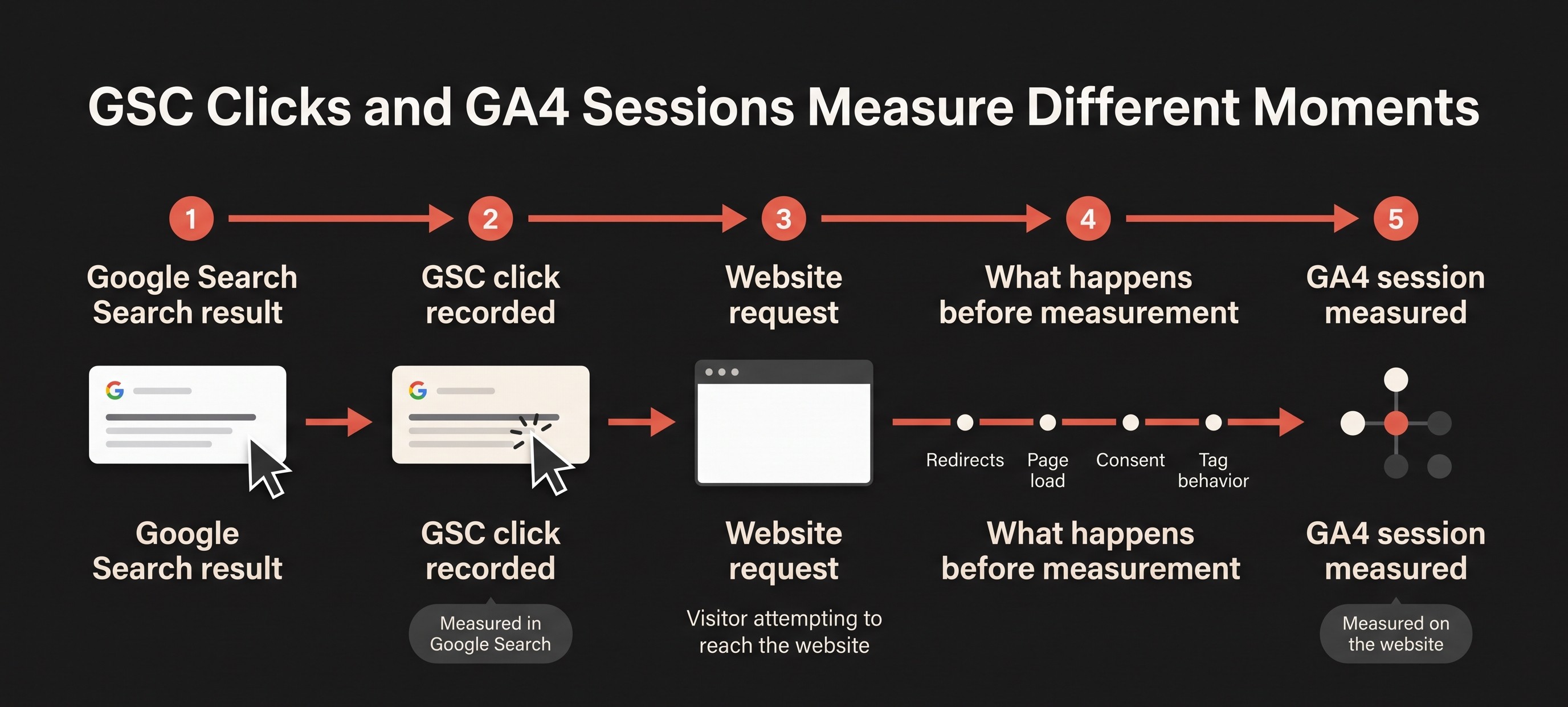
| Comparison point | Google Search Console | Google Analytics 4 | Why it matters |
|---|---|---|---|
| Primary unit | Click from a Google Search result | A processed session on the website or app | One click does not automatically create one session. |
| Measurement location | Google Search results | Your website or app measurement setup | A click can exist even when site-side measurement does not complete. |
| Traffic scope | Google Search, separated by available search types | All measured channels and potentially several search engines | GA4 Organic Search can be broader than GSC Web clicks. |
| Page grouping | Most page data is credited to the canonical URL | Landing-page values can include URL variants and query strings | Page rows can disagree even when the underlying visit is related. |
| Time | Most daily views use Pacific Time, with processing delay | Uses the GA4 property’s configured time zone | Short comparisons can place the same activity on different dates. |
If you need a refresher on the search-side numbers, start with SearchCounselCo’s guide to clicks, impressions, CTR, and average position. A mismatch between the platforms is a measurement question. By itself, it does not prove that rankings or real traffic changed.
Align the reports before diagnosing the difference
Most bad comparisons fail before the numbers are exported. One report includes all organic search engines while the other includes Google Web Search. One property contains every subdomain while the other contains a single web stream. One period includes yesterday’s incomplete Search Console data. Fix the scope before investigating implementation.
1. Use finalized dates
Choose a complete period that ends at least three days before the audit. A 28-day range is usually long enough to reduce daily noise while remaining close to recent site changes. Note both reporting time zones, especially when you compare day-level movement.
2. Match the search source
Set Search Console to Search type: Web. In GA4, do not use the entire Organic Search channel as the default comparison. Filter the Traffic acquisition report to Session source / medium = google / organic, or use the linked Google organic search traffic report. Other engines included in GA4 will otherwise inflate the Analytics side.
3. Match the site and property scope
Confirm that the GSC property, GA4 property, selected web stream, hostname, protocol, and subdomains cover the same website. A Domain property can include hostnames that a single GA4 stream or hostname filter excludes. Write the exact scope into the audit record so another analyst can reproduce it.
4. Match country and device filters
If the business question concerns a specific country or device, apply the same segment in both tools. Do not compare mobile-only Search Console clicks with all-device GA4 sessions, or US-only search clicks with global Analytics traffic.
5. Normalize landing pages
Export page-level data and create a common path key. Map redirects and canonical URLs, standardize trailing slashes, and remove only those query parameters that do not represent meaningfully different pages. Keep the raw exports untouched so your normalized comparison can be audited.
Important: linking Search Console and GA4 does not force the two metrics to match. Google’s organic search reports can reduce avoidable property and date-selection mistakes, but clicks and sessions remain different measurements.
For broader setup guidance, see how to set up and use Google Search Console.
Read the direction of the GSC and GA4 gap
The direction is a triage signal, not a diagnosis. Several causes may operate at once. Look for a sudden change, a concentration on one template, country, device, or hostname, and a release or configuration event close to the first divergence.
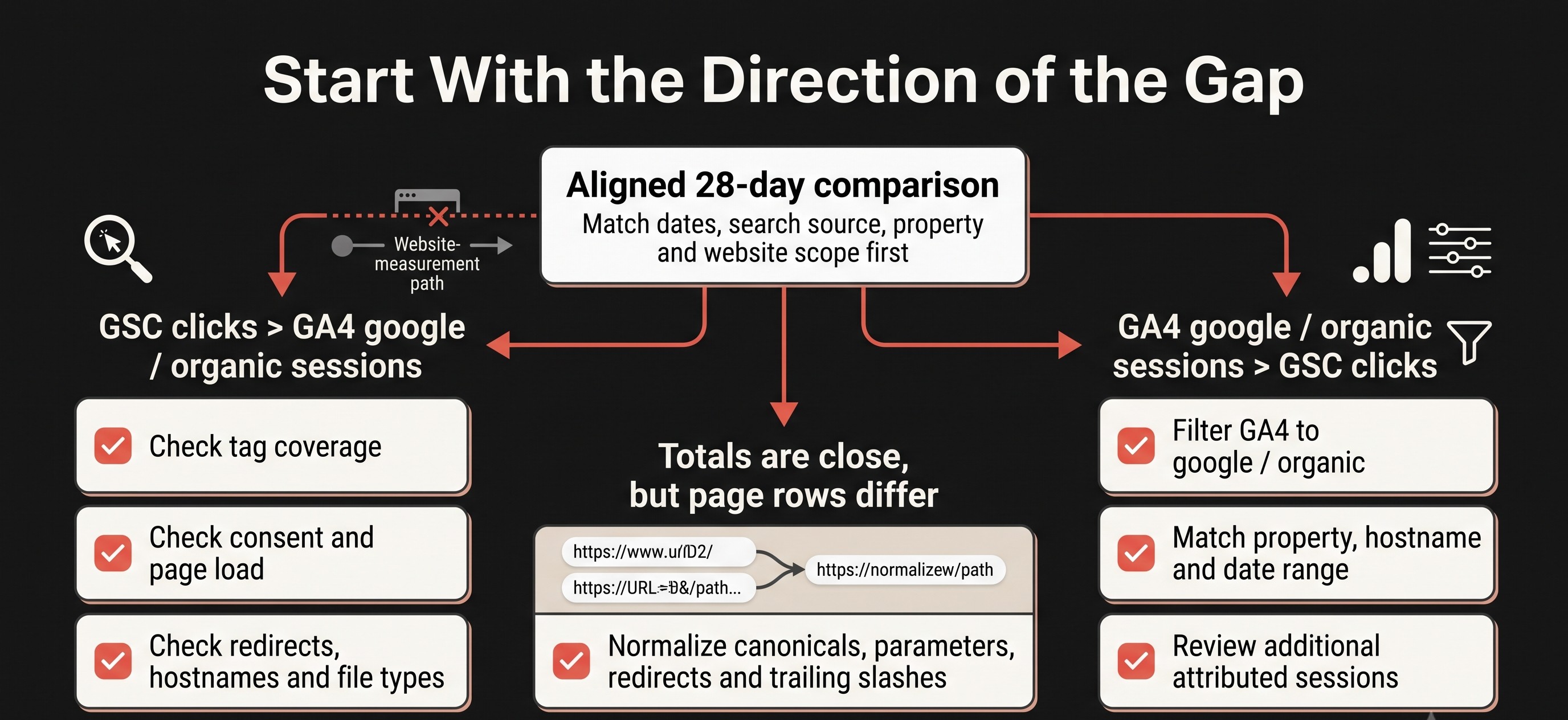
| Pattern | Check first | Possible explanation | Next test |
|---|---|---|---|
| GSC clicks are higher than GA4 google / organic sessions | GA4 tag coverage, consent, page load, hostnames, redirects, and file type | The click was recorded in Search, but site-side measurement did not create or attribute a comparable session. | Split the gap by landing-page template, device, and country; test the largest outliers. |
| GA4 organic sessions are higher than GSC clicks | Search-engine scope, session source, property scope, hostname, and date range | GA4 may include other engines or additional sessions attributed to google / organic. | Filter to google / organic, match the hostname, and compare a complete multi-week period. |
| Totals look close, but page rows do not | Canonical URLs, parameters, redirects, and trailing slashes | The platforms can display related activity under different URL forms. | Aggregate both exports with a documented normalized path key. |
| GSC chart total exceeds visible query rows | Anonymized queries, filters, and table limits | Some query detail can be omitted even though activity remains in totals. | Compare page totals and remove query filters before blaming site tracking. |
| The gap changes after a release | Tag deployment, consent manager, redirects, domains, and templates | A measurement implementation changed while search clicks continued. | Match the divergence date to releases and test affected templates. |
If total GSC clicks remain stable but individual terms seem to disappear, use the guide to keywords missing from Google Search Console. Query-table omissions are a separate reporting problem and should not be treated as lost GA4 sessions.
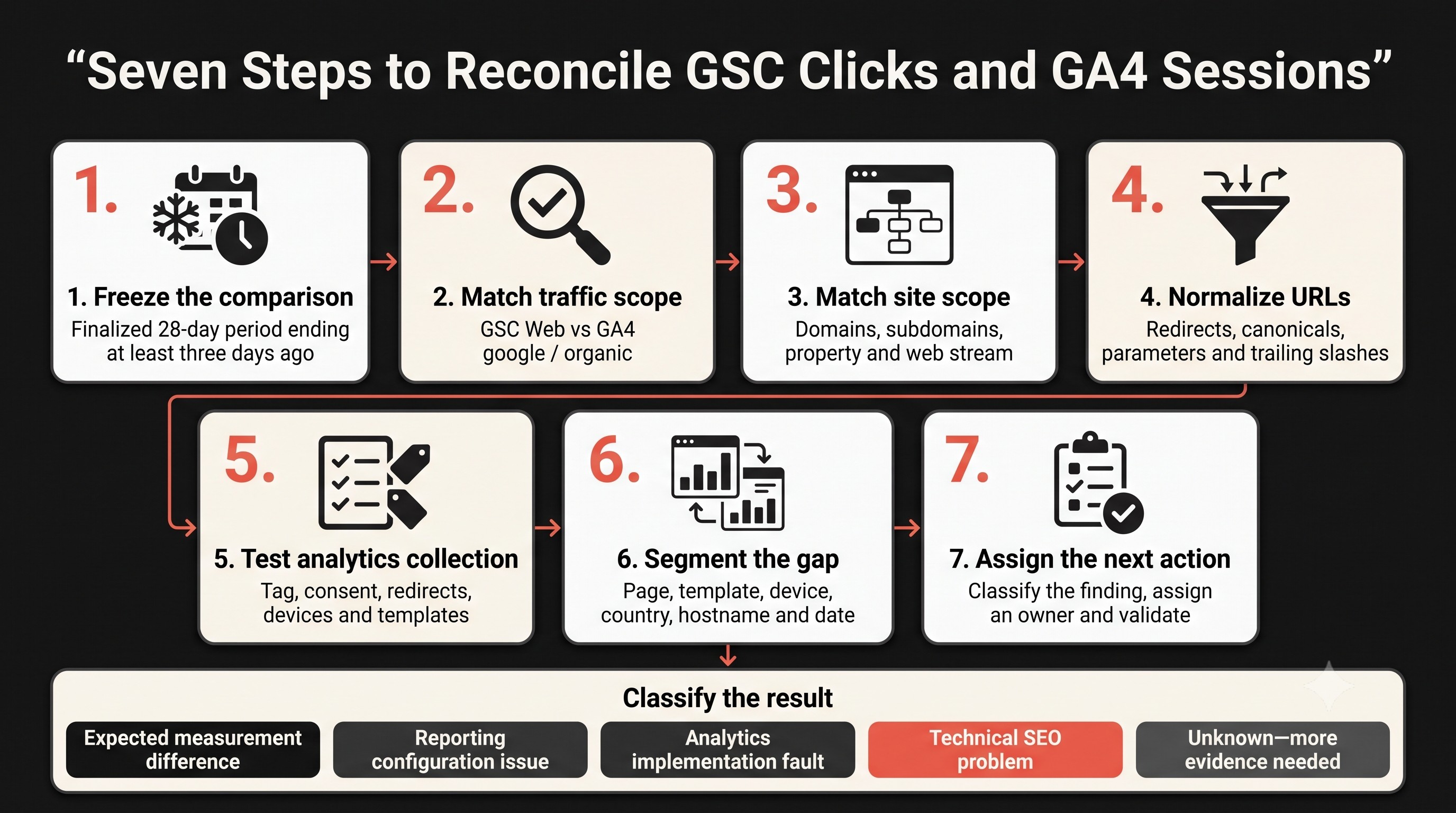
A seven-step GSC vs GA4 diagnostic workflow
1. Freeze the comparison
Choose one finalized 28-day period ending at least three days ago. Export both reports and note the property time zones. Do not keep changing the filters while forming the diagnosis.
2. Match traffic scope
Set GSC to Web. In GA4, use Session source / medium = google / organic. If you also want to understand traffic from Bing, DuckDuckGo, or another engine, analyze it separately rather than mixing it into the reconciliation.
3. Match the site scope
Confirm domains, subdomains, protocols, the GA4 web stream, and the Search Console property. Inspect whether staging domains, app subdomains, translated hostnames, or cross-domain checkout pages are included on only one side.
4. Normalize the URLs
Map redirects and canonical URLs, then aggregate equivalent paths. Decide intentionally how to handle trailing slashes, uppercase characters, URL parameters, AMP pages, PDF files, and other non-HTML results. This step often explains why sitewide totals look reasonable while page-level rows look chaotic.
5. Test analytics collection
Check the GA4 tag or tag-manager container on representative organic landing pages. Test before and after the consent decision, on mobile and desktop, and across major templates. Confirm that redirects reach the expected destination and that the final page fires the intended measurement events.
6. Segment the gap
Break the difference down by landing page, template, device, country, hostname, and date. A sitewide percentage is vague. A gap concentrated on a new article template, mobile users in one country, or PDF URLs is testable.
7. Assign the next action
Classify each finding as an expected measurement difference, reporting configuration issue, analytics implementation fault, technical SEO problem, or unknown. Give every fix an owner and validation date. That turns an argument between dashboards into a controlled investigation.
Save these details in the audit record
- GSC property, search type, filters, date range, and export time.
- GA4 property, web stream, hostname, source filter, date range, and time zone.
- Raw totals and the landing-page comparison after URL normalization.
- Release, tag, consent, redirect, or domain changes near the divergence date.
- Templates tested, evidence observed, responsible owner, fix, and validation date.
Once the numbers are understood, connect them to outcomes using organic conversions and key events in GA4. Search clicks, measured sessions, engagement, leads, and revenue belong to different stages of the reporting chain.
Worked example: finding a template-level tracking gap
Fictional example for method demonstration
A US publisher compares a finalized 28-day period and sees 12,400 GSC Web clicks against 8,100 GA4 sessions filtered to google / organic. The team does not label the 4,300 difference “lost traffic.” It first aligns the hostname, country, device scope, dates, and reporting time zones.
When both exports are grouped by normalized landing-page path, most page types follow the same trend. Two exceptions appear. A PDF library receives 2,300 Search clicks but has no normal HTML pageview collection. A newly deployed article template shows 1,450 Search clicks while its GA4 tag fails during a spot test. The remaining difference is distributed across pages rather than concentrated in one pattern.
The action is specific: document the PDF measurement limitation, repair the article-template implementation, annotate the release date, and monitor the affected paths after the fix. The example does not assume that every click should become one session. It shows how segmentation can expose a testable fault.
Why a fixed percentage would fail here
A single threshold ignores content formats, consent choices, returning-user behavior, property structure, session attribution, and implementation history. It could normalize a serious template failure or create panic over an explainable difference. A concentrated change tied to a release is more actionable than a large sitewide percentage with no pattern.
When the difference needs action
Escalate the discrepancy when it changes suddenly, is concentrated on revenue-driving pages, appears after a measurable implementation change, or creates contradictory business decisions. A stable difference with aligned trends can be documented. An unstable or segmented difference needs investigation.
| Finding | Likely owner | Action |
|---|---|---|
| GA4 tag is missing or inconsistent on a template | Analytics or development | Repair collection, test representative URLs, annotate deployment, and monitor. |
| Consent implementation changed measured sessions | Analytics, privacy, and development | Verify behavior against the intended policy; do not bypass visitor choices. |
| GSC and GA4 cover different hostnames or streams | Analytics administrator | Correct the comparison scope or linking configuration. |
| Page rows differ because of canonicals or redirects | Technical SEO and development | Confirm canonicalization, redirect behavior, and normalized reporting keys. |
| Only query-row totals appear short | SEO analyst | Document privacy and table limits; do not change the site without an indexing signal. |
| Aligned trends agree while totals remain different | Reporting owner | Label the measurement difference and monitor for a structural change. |
Use GSC to understand Google Search visibility, queries, pages, impressions, and clicks. Use GA4 to understand measured sessions, engagement, key events, and revenue after visitors reach the site. Then organize the metrics by decision value with SearchCounselCo’s SEO KPI framework.
FAQ
Should GSC clicks equal GA4 sessions?
No. They measure different units at different points in the journey. Search Console records clicks from Google Search; GA4 processes website or app activity into sessions. Align the reporting scope and investigate material changes, but do not expect a one-to-one total.
Why are GSC clicks higher than GA4 sessions?
Possible causes include site-side collection not completing, consent or tag behavior, unmatched hostnames or web streams, redirects, non-HTML landing URLs, time zones, and Search Console processing delay. Segment by landing page, device, country, and date to locate the difference.
Why are GA4 organic sessions higher than GSC clicks?
First check whether GA4 includes all organic search engines instead of only google / organic. Also verify session attribution, hostname and property scope, web streams, and date boundaries. GA4 organic sessions and GSC Web clicks are not equivalent metrics.
What percentage difference between GSC and GA4 is acceptable?
Google does not publish a universal acceptable percentage. Establish a site-specific baseline after aligning the reports, then investigate sudden, concentrated, or business-critical changes. A fixed threshold can hide implementation faults.
Which platform should I use for SEO reporting?
Use both, but label each metric clearly. GSC is the primary source for Google Search impressions, clicks, queries, pages, and positions. GA4 shows measured sessions, engagement, key events, and revenue after people reach the site.
Can connecting GSC with GA4 eliminate the discrepancy?
No. Linking the products can make comparison easier and reduce scope mistakes, but it does not redefine clicks as sessions. The linked reports still contain metrics built from different collection systems.
How often should I reconcile GSC and GA4?
Check the relationship during regular monthly reporting and perform a deeper reconciliation after major tag, consent, domain, redirect, analytics, or website-template changes. Save the baseline so you can identify a structural break quickly.
The one thing to do next
Export one finalized 28-day period from both platforms, filter GA4 to google / organic, normalize the landing-page paths, and sort pages by the size of the difference. Test the largest template-level outliers first. If the gap still cannot be explained, SearchCounselCo’s SEO consulting process can turn the reports, implementation evidence, and technical findings into a prioritized action plan.
Sources used
Primary guidance was checked in August 2026 using Google’s documentation on Search Console data discrepancies, dimensions and data grouping, organic-search reporting in GA4, connecting Search Console with Google Analytics, how Analytics sessions are measured, and Google consent mode. These sources do not establish a universal acceptable discrepancy percentage. Analytics interfaces, attribution rules, consent implementation, and reporting behavior may change, so confirm the latest documentation and your account configuration before applying time-sensitive recommendations.